
1. Why '18+ Target Audience' Does Not Exempt Social or Dating Apps
Indie founders launching niche book clubs, runner meetups, language-exchange chats, or dating MVPs routinely select `18 and over` under **Target audience and content**, assuming child-safety declarations only apply to kids' games under the Families Policy. When they try to publish their Closed Testing `.aab`, Play Console blocks submission with a mandatory task: **Child safety standards**.
Google Play's **Child Safety Standards policy**—targeting Child Sexual Abuse and Exploitation (CSAE) and Child Sexual Abuse Material (CSAM)—is triggered by **Store Listing Category (`Social` or `Dating`)** and open interpersonal communication capabilities, *not* by whether children are invited to use the app. Even an adults-only professional networking or dating app must maintain explicit standards, in-app reporting, rapid takedown procedures, and a reachable safety contact (`safety@example.com`).
| Declaration Pillar | What Play Console Requires | Common Indie Rejection Mistake |
|---|---|---|
| 1. Published Standards URL | Public HTTPS page naming your app/developer & anti-CSAE policy | Linking a generic Privacy Policy that never mentions CSAE/CSAM |
| 2. In-App Feedback / Reporting | Native UI button to flag/report child safety or abusive content | Telling users solely to open an external browser mailto link |
| 3. CSAM Action & Legal Escalation | Workflow to remove CSAM, ban accounts & report to NCMEC/authorities | Having database rows with zero admin moderation/delete capability |
| 4. Child Safety Point of Contact | Verified, monitored contact email (`safety@example.com`) in Console | Entering an unmonitored `noreply@example.com` mailbox |
2. Wiring In-App Safety Reporting & UGC User Blocking in One Pass
Whenever an app supports user profiles, direct messages, comments, photo uploads, or community feeds, Google reviewers inspect two overlapping policies simultaneously: **Child Safety Standards** and **User-Generated Content (UGC)**. Passing one while failing the other still blocks your release.
Build a unified moderation menu (`⋮` overflow action on every profile, chat thread, and post, plus a dedicated **Report a Safety Concern** entry inside Settings) that lets users choose a structured reason—including an explicit *Child safety / CSAE concern* high-priority flag—immediately hides blocked users locally and server-side, and dispatches high-priority alerts to your moderation queue.
{
  "appPackage": "com.example.runclubsocial",
  "reportType": "CHILD_SAFETY_CSAE_PRIORITY",
  "targetEntityType": "CHAT_MESSAGE",
  "targetEntityId": "msg_98412a",
  "reportedUserId": "usr_77310",
  "immediateClientAction": ["HIDE_CONTENT_FOR_REPORTER", "BLOCK_SENDER_THREAD", "FREEZE_MEDIA_CDN_URL"],
  "escalationRouting": {
    "designatedSafetyInbox": "safety@example.com",
    "preserveAuditEvidence": true,
    "mandatoryAuthorityReport": "NCMEC_CYBERTIPLINE_OR_APPLICABLE_REGIONAL_AUTHORITY"
  }
}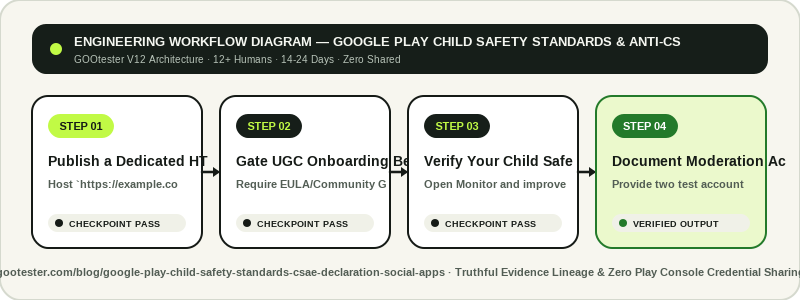
3. 4-Step Walkthrough to Pass Child Safety & UGC Review Before Day 1
Do not wait until Day 14 of Closed Testing to bolt on a report button. Google Play reviews your initial Closed Testing release against all App Content declarations before a single external tester can download your app.
Complete these four engineering and documentation steps before clicking **Start rollout to Closed testing**.
- Publish a Dedicated HTTPS Child Safety Standards Page: Host `https://example.com/child-safety` stating your exact app title, developer legal name, zero-tolerance policy against CSAE/CSAM, in-app reporting steps, and contact `safety@example.com`.
- Gate UGC Onboarding Behind Terms & Add Block + Report Buttons: Require EULA/Community Guidelines acceptance before users post or message, and place 2-tap Block User and Report Content buttons on every UGC surface.
- Verify Your Child Safety Point of Contact in App Content: Open Monitor and improve > Policy and programs > App content > Child safety standards, paste your public URL, enter `safety@example.com`, and verify the OTP code.
- Document Moderation Access in App Access Instructions: Provide two test accounts (`reviewer@example.com`) or seeded demo posts in App Access so Google reviewers can test reporting and blocking immediately.
Actionable Pre-Submission Verification Checklist
- Publish a standalone, login-free HTTPS `/child-safety` web page naming your exact Android app and developer entity.
- Implement 2-tap in-app **Report** (including a Child Safety reason) and **Block User** actions on all UGC/chat screens.
- Require explicit Community Guidelines / Terms acceptance before a user can upload media or send messages.
- Establish backend admin tooling to quarantine flagged media, ban offending accounts, and escalate CSAM legally.
- Verify a live, monitored Child Safety Point of Contact email inside Play Console > App content > Child safety standards.
- Seed sample community posts and provide working demo credentials in App Access before starting Closed Testing.
Frequently Asked Questions
Why do I see the Child Safety Standards requirement if my app only allows users aged 18+?
Google Play scopes the Child Safety Standards anti-CSAE declaration to all apps in the Social and Dating categories regardless of target age group, ensuring every social platform enforces CSAM prevention, reporting, and takedown standards.
Can my Child Safety Standards link point to a section on my main website domain?
Yes. Hosting a clean public page like `https://example.com/child-safety` (or an anchored, clearly titled section on your public legal page) works well as long as it loads without authentication, names your app, and explicitly details your anti-CSAE policy.
Do I still need in-app blocking if I completed the Child Safety Standards form?
Yes! Any app featuring User-Generated Content (UGC) must satisfy Google Play's UGC policy—which requires in-app user blocking, in-app content reporting, and upfront Terms acceptance—in addition to the Child Safety Standards declaration.
Should external closed testers click my Report button during the 14-day test?
Having testers verify that profile blocking, safety reporting modals, and empty-state validations function properly—without submitting real abuse escalations—is great functional QA to cite in your Day-15 Production Access summary.