1. 1. Resolving `com.google.android.gms.permission.AD_ID` Merged Manifest Mismatches
One of the most frequent build-blocking errors when uploading an Android 13+ (`targetSdk 33` through `targetSdk 35`) App Bundle to Closed Testing is Play Console flagging an undeclared `com.google.android.gms.permission.AD_ID` permission—even when you never wrote `AD_ID` anywhere in your own `app/src/main/AndroidManifest.xml`.
This happens because Gradle's manifest merger combines `<uses-permission>` declarations from every transitive AAR dependency in your dependency tree. Including `firebase-analytics`, `play-services-measurement-api`, `play-services-ads`, RevenueCat, Adjust, or Crashlytics companion modules frequently merges `AD_ID` silently into `app/build/intermediates/merged_manifests/release/AndroidManifest.xml`.
You have two deterministic engineering fixes depending on your product architecture: if your app legitimately uses analytics attribution or ad monetization, keep the permission and answer **Yes** inside **App content > Advertising ID**. Conversely, if your app is an ad-free utility that never reads the Advertising ID, strip the injected node explicitly with `tools:node="remove"` and disable AdID collection in your analytics metadata.
<manifest xmlns:android="http://schemas.android.com/apk/res/android"
    xmlns:tools="http://schemas.android.com/tools">

    <!-- Option A: Remove transitive AD_ID for ad-free / Families apps -->
    <uses-permission
        android:name="com.google.android.gms.permission.AD_ID"
        tools:node="remove" />

    <application>
        <meta-data
            android:name="google_analytics_adid_collection_enabled"
            android:value="false" />
    </application>
</manifest>
2. 2. Three-Way Alignment: Merged Manifest, Advertising ID & Data Safety
Play Console runs automated static bytecode inspection across every uploaded `.aab` and cross-checks the binary against both **App content > Advertising ID** and **App content > Data safety**. Answering **Yes** to Advertising ID while answering **No, my app does not collect or share user data** on your Data Safety form creates an instant logical contradiction that stalls Closed Testing review.
Whenever your merged manifest retains `AD_ID` and initializes an SDK such as AdMob or Firebase Analytics, open your Data Safety questionnaire, select **Device or other IDs**, mark it as **Collected** (and **Shared** if transmitted to third-party ad bidding networks), confirm TLS encryption in transit, and match the exact usage purposes (`Analytics`, `Advertising or marketing`, `Fraud prevention, security, and compliance`) declared in your Advertising ID form.
Always inspect Play Console's **Bundle Explorer > Permissions** tab right after uploading a release candidate. Verifying the exact merged permission list compiled into your signed AAB takes thirty seconds and prevents multi-day policy rejection round-trips.
| App Architecture | Merged Manifest AD_ID | App Content: Advertising ID | Data Safety: Device or Other IDs |
|---|---|---|---|
| Pure Offline Utility (No SDKs) | Absent | Declare 'No' | Not collected / Not shared |
| Firebase Analytics (AdID Disabled) | Removed via tools:node='remove' | Declare 'No' | Declare App Instance ID if analytics enabled |
| Firebase Analytics (Default) | Present | Declare 'Yes' (Analytics) | Collected (Analytics) |
| AdMob Monetized App (18+ / 13+) | Present | Declare 'Yes' (Ads + Analytics + Fraud) | Collected & Shared (Advertising / Analytics) |
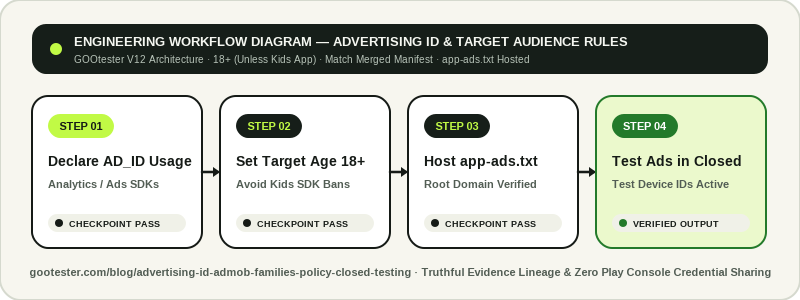
3. 3. Protecting Your AdMob Account During Closed Testing & Hosting `app-ads.txt`
Indie developers monetizing with Google AdMob face a critical operational hazard during 14-day closed testing: if 12 to 25 closed testers repeatedly open screens rendering live production AdMob banners, rewarded videos, or interstitials while total global Play Store traffic is tiny, AdMob's automated Invalid Traffic (IVT) risk engine frequently flags abnormal impression-to-click density and imposes an **Ad serving limit** right before your public launch.
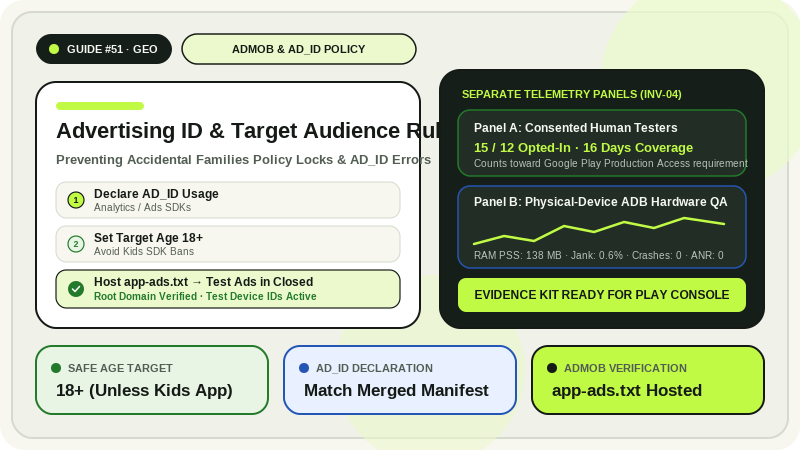
Protect your publisher standing by serving Google's official Demo Test Ad Unit IDs (or dynamically switching between test ad units and live ad units via remote config / build flavor until Production graduation), and register physical development handsets via `RequestConfiguration.Builder().setTestDeviceIds(...)`. Never ask testers to click ads `'to verify they work'`.
At the same time, configure your `app-ads.txt` authorization file early. Host `https://example.com/app-ads.txt` containing your exact `google.com, pub-0000000000000000, DIRECT, f08c47fec0942fa0` record at the root domain matching the **Developer website** URL entered in **Grow > Store presence > Store settings**, allowing Google's crawler to verify ownership before Production traffic scales.
4. 4. The Target Audience Trap: Why Checking 'Under 13' Triggers Instant Rejections
Inside **Policy > App content > Target audience and content**, Play Console asks which age groups your app targets: `Under 5`, `6–8`, `9–12`, `13–15`, `16–17`, and `18 and over`. Many developers building harmless habit trackers, study timers, or puzzle games check **every single box** thinking, `'Children could safely use my app too!'`
Checking *any* age bracket under 13 enrolls your binary into Google Play's **Families Policy**—the strictest compliance regime on Android. Under Families rules, transmitting `AD_ID` is unconditionally forbidden (causing automatic rejection if `AD_ID` exists in your manifest), every bundled SDK must belong to Google's Families Self-Certified Ads SDK program, Google Sign-In / OAuth flows face strict child restrictions, and mixed-audience apps must implement a neutral age screen (`AgeGate`) that dynamically disables personalized tracking for minors.
Unless your application is intentionally engineered from the ground up for children under 13, select **`18 and over`** (or `13–15`, `16–17`, `18 and over` if built for teens and adults, ensuring you also select `'No'` when asked if your store listing could unintentionally appeal to children via cartoon mascots).
- General Consumer / Productivity / SaaS Apps: Select 18+ (or 16–17 and 18+) unless minors are an explicit product audience.
- Unintentional Appeal Check: Avoid child-oriented cartoon characters in your icon if your target audience excludes Under-13.
- Zero AD_ID in Child-Directed Builds: Apps targeting solely children must strip `com.google.android.gms.permission.AD_ID` completely.
- Neutral Age Screen Requirement: Apps targeting both Under-13 and 13+ must ask age neutrally (without pre-filling birth years) and set `TAG_FOR_CHILD_DIRECTED_TREATMENT_TRUE` when needed.
- Ads Policy Alignment: Interstitials must never appear immediately on app cold launch or upon exiting the application.
5. 5. Implementing Google UMP Consent Flows for Global Closed Testers
Because enabling **All countries / regions** on your Closed Testing track is standard practice to avoid regional HTTP 404 opt-in blocks, testers joining from European Economic Area (EEA) countries, the UK, or Switzerland will exercise European privacy paths inside your app.
Any AdMob-enabled Android app serving users in EEA/UK/Switzerland must integrate Google's **User Messaging Platform (`com.google.android.ump:user-messaging-platform`) SDK** to display an IAB TCF v2.2 certified consent message prior to initializing `MobileAds.initialize()`. Failing to handle consent state causes zero ad fill in European regions and violates Google's EU User Consent Policy.
Ensure your UMP consent callback includes a clean timeout and offline fallback so that if a tester launches your app on a restricted firewall or airplane-mode test case, the onboarding flow proceeds smoothly into your core UI rather than hanging indefinitely on a spinner.
- Inspect Merged Manifest in Bundle Explorer: Verify whether AD_ID is present in your compiled AAB and remove it with tools:node='remove' if unrequired.
- Synchronize Advertising ID & Data Safety: Match your App Content > Advertising ID answers and purposes 1:1 with Data Safety > Device or other IDs.
- Set Accurate Target Audience Age Brackets: Select 18+ (or appropriate 13+/16+ brackets) unless your app is genuinely engineered for Google Play Families Policy compliance.
- Gate AdMob Test Mode & Publish app-ads.txt: Use test ad units during closed testing to prevent invalid-traffic flags and publish app-ads.txt on your verified developer domain.
6. 6. Validating Ad-Supported Indie Apps Cleanly with GOOtester
Resolving `AD_ID`, Data Safety, AdMob test safeguards, and Target Audience declarations *before* submitting your Closed Testing release turns policy review from a multi-week guessing game into a predictable 24-hour approval.
With GOOtester, you connect our managed Google Group (`testers@gootester.com`) to your Closed Testing track without ever sharing Play Console credentials or AdMob publisher details. Our human testers ($6 Basic for 12 testers / 14 days, $12 Standard for 15 testers / 16 days, $20 Premium for 25 testers / 24 days) install your Play-signed binary across diverse global Android devices and maintain continuous opt-in status.
Once your 14-day closed testing requirement completes and Production Access is granted, you can flip your remote flag or promoted Production AAB from Demo Test Ad Units to live AdMob inventory with `app-ads.txt` already verified.
Eliminating Disruptive Interstitial Ad Violations
Never trigger full-screen interstitial ads asynchronously after a user has already moved onto a text-input screen; bind interstitials strictly to deterministic screen-transition breaks.
Verifying Store Settings Developer Website Domain
Double-check that your Store Settings website (`https://example.com`) uses the exact root domain hosting `/app-ads.txt` without cross-domain redirects to link-tree pages.
Actionable Pre-Submission Verification Checklist
- Check Bundle Explorer > Permissions on your uploaded AAB to confirm whether transitive SDKs injected AD_ID.
- Either declare Advertising ID usage accurately in App Content + Data Safety, or strip AD_ID with tools:node='remove'.
- Configure AdMob Demo Test Ad Units or test device IDs during closed testing to avoid Invalid Traffic ad limits.
- Host /app-ads.txt at the root HTTPS domain configured under Play Console > Store settings > Developer website.
- Do NOT select Under-13 age brackets in Target Audience unless your binary fully complies with Families Policy.
- Integrate Google UMP SDK with non-blocking offline fallbacks if serving AdMob ads across EEA/UK regions.
Frequently Asked Questions
Why does Play Console say my app uses Advertising ID when I have zero ads in my app?
Libraries like Firebase Analytics (`play-services-measurement-api`) declare `com.google.android.gms.permission.AD_ID` inside their own manifest, which Gradle merges into your release AAB. Either declare Analytics usage in App Content > Advertising ID or remove the permission using `tools:node="remove"`.
Should I show live AdMob ads to my 12 closed testers during the 14-day test?
We strongly recommend using Google's official AdMob Test Ad Unit IDs (or remote-config gating) during closed testing. Small tester pools generating repeated impressions can trigger automated AdMob Invalid Traffic serving limits before your public launch.
Can I change my Target Audience from 'All Ages (Under 13 included)' to '18+' if Google rejects my app?
Yes. Navigate to Policy > App content > Target audience and content, uncheck all Under-13 age brackets, ensure your store icons do not use child-targeted cartoon themes, save, and resubmit via Publishing Overview.
Does GOOtester require access to my AdMob or Play Console account to run closed testing?
Never. GOOtester operates on a strict zero-credential model: you only add `testers@gootester.com` to your Closed Testing Google Groups field and submit your public Web Opt-In URL.