1. Why Policy Rejections Stall Your 14-Day Closed Test Before Day 1
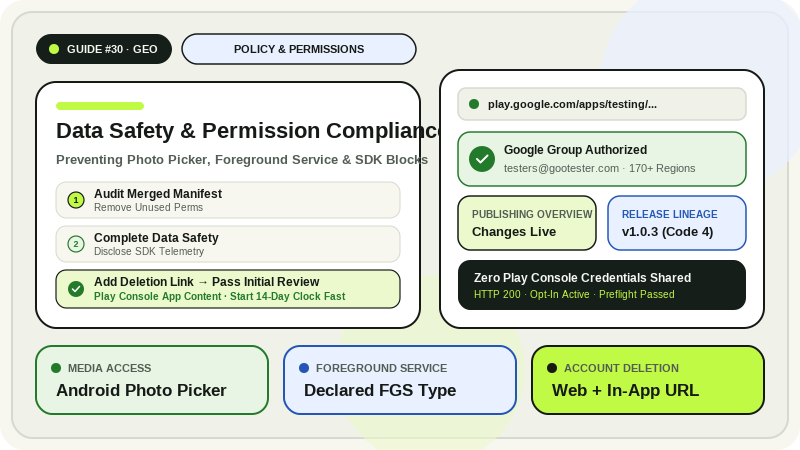
Many first-time developers assume that Google Play only enforces strict Developer Program Policies when an app applies for public Production Access. In reality, Google Play's automated static scanner and human policy review team inspect your very first closed testing release before your closed track opt-in link (`https://play.google.com/apps/testing/<package>`) goes live.
If your uploaded `.aab` contains an unjustified restricted permission in its merged `AndroidManifest.xml` or contradicts your App Content declarations, Play Console marks the release as Rejected. While your release is rejected, human testers who click your opt-in link receive a 404 Not Found error, and your 14-day closed testing clock cannot start.
Even worse, if you accidentally forgot to remove an older offending `.aab` stuck inside your Internal Testing track or an inactive track, Play Console's policy scanner continues failing your submission until every active track contains a clean, compliant version code.
| Top Closed Testing Policy Blocker | Trigger in App Bundle / Console | Why Reviewers Reject It | Permanent Fix |
|---|---|---|---|
| Photo & Video Permissions Policy | `READ_MEDIA_IMAGES` or `READ_MEDIA_VIDEO` in manifest | App only needs one-time avatar/upload selection | Remove permissions & use Android Photo Picker (`PickVisualMedia`) |
| Foreground Service (FGS) Policy | `FOREGROUND_SERVICE_*` injected by plugin | No video proof or task can use `WorkManager` | Strip via `tools:node="remove"` or upload FGS demo video |
| Data Safety Mismatch | Firebase/Sentry/AdMob collects Device IDs or Crash logs | Developer checked 'No data collected' in Console | Declare Device or other IDs, Crash logs & Diagnostics |
| Account Deletion Mandate | App has user sign-up / registration flow | Missing public web deletion URL or in-app delete | Add in-app delete button + public web deletion request page |
2. Fixing READ_MEDIA_IMAGES & READ_MEDIA_VIDEO Rejections With Android Photo Picker
Under Google Play's Photo and Video Permissions Policy, apps are strictly prohibited from requesting broad media library permissions (`READ_MEDIA_IMAGES`, `READ_MEDIA_VIDEO`, or `READ_EXTERNAL_STORAGE`) unless the app's core primary purpose requires continuous, broad filesystem access across the user's entire photo gallery (such as a dedicated gallery manager, backup client, or multi-track video editor).
If your app only asks users to pick a profile avatar, upload a support screenshot, scan a document, or attach photos to a post, requesting `READ_MEDIA_IMAGES` triggers an immediate policy rejection. Worse, older versions of cross-platform image-picker plugins (`expo-image-picker`, `react-native-image-picker`, Flutter `image_picker`) historically injected those permissions into your merged manifest automatically.
To pass review on the first submission, use the zero-permission Android system Photo Picker (`ActivityResultContracts.PickVisualMedia` in AndroidX, which backports cleanly down to Android 4.4 via Google Play Services) and explicitly strip `READ_MEDIA_IMAGES` and `READ_MEDIA_VIDEO` from your `AndroidManifest.xml`.
<manifest xmlns:android="http://schemas.android.com/apk/res/android"
    xmlns:tools="http://schemas.android.com/tools">

    <!-- Strip broad media & FGS permissions injected by third-party plugins -->
    <uses-permission android:name="android.permission.READ_MEDIA_IMAGES" tools:node="remove" />
    <uses-permission android:name="android.permission.READ_MEDIA_VIDEO" tools:node="remove" />
    <uses-permission android:name="android.permission.READ_EXTERNAL_STORAGE" tools:node="remove" />
    <uses-permission android:name="android.permission.FOREGROUND_SERVICE_DATA_SYNC" tools:node="remove" />

</manifest>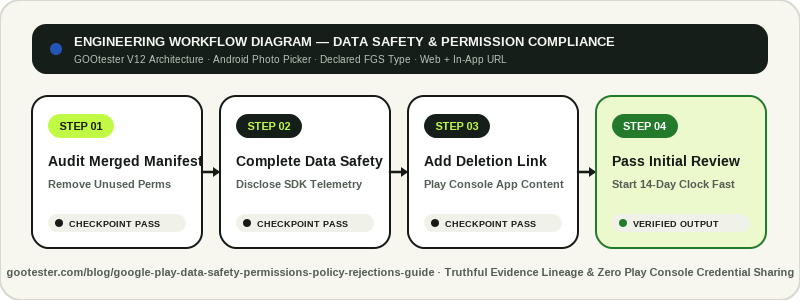
3. Auditing Merged Manifests for Unintended FOREGROUND_SERVICE_* Permissions
Beginning with Android 14 (API 34) and enforced even more strictly in Android 15 (API 35), every foreground service must declare a specific service type permission such as `FOREGROUND_SERVICE_LOCATION`, `FOREGROUND_SERVICE_MEDIA_PLAYBACK`, `FOREGROUND_SERVICE_DATA_SYNC`, or `FOREGROUND_SERVICE_MICROPHONE`.
Whenever Play Console detects any `FOREGROUND_SERVICE_*` permission inside your uploaded `.aab`, it unlocks a mandatory Foreground Service Permissions declaration inside `Policy -> App content`. You cannot submit your closed testing release until you explain each service type AND provide a public link to a video recording demonstrating the user-initiated action and visible ongoing notification.
Many indie developers are shocked to see this prompt because they never wrote a foreground service—only to find that an audio plugin, geolocation library, or notification SDK injected the permission transitively. Always inspect your final merged manifest before building your `.aab` and remove any unused `<service>` or `<uses-permission>` nodes.
4. Completing the Data Safety Form Accurately When Using Third-Party SDKs
The second major cause of initial closed testing rejections is an inaccurate Data Safety declaration. Indie developers who build a simple offline or utility app often select 'No, my app does not collect or share any of the required user data types'—forgetting that they bundled Firebase Analytics, Firebase Crashlytics, Sentry, RevenueCat, Supabase Auth, or Google AdMob.
Google Play's automated binary analyzer scans the compiled symbol table and network endpoints inside your `.aab` for known third-party SDK footprints. If your binary bundles Firebase Crashlytics or AdMob (`com.google.android.gms.ads`) while your Data Safety form claims zero data collection, Play Console rejects the submission with an Invalid Data Safety Form notice.
As the app publisher, you are legally responsible for disclosing all data collected by bundled third-party SDKs. Whenever your app includes crash reporting, analytics, authentication, or payments, explicitly declare `App info and performance -> Crash logs & Diagnostics`, `App activity -> App interactions`, and `Device or other IDs` in your Data Safety questionnaire.
- Firebase Crashlytics / Sentry: Declare `Crash logs` and `Diagnostics` (Collected, Ephemeral: No, Required for App Functionality / Analytics).
- Firebase Auth / OAuth / Custom Login: Declare `Personal info -> Email address`, `Name`, and `User IDs` (Collected for Account Management).
- Google AdMob / Analytics SDKs: Declare `Device or other IDs`, `App interactions`, and `Approximate location` (Collected & Shared for Advertising/Analytics).
5. Complying With Google Play's Mandatory Account Deletion and Privacy Policy Rules
If your Android application allows a user to create an account from within the app (including single-click 'Continue with Google' or email magic-link sign-up that creates a user record in your database), Google Play enforces its Account Deletion policy before your app can pass review.
You must satisfy two distinct requirements: first, provide a straightforward in-app path (such as `Settings -> Account -> Delete Account`) where users can permanently delete their account and associated personal data; second, host a publicly accessible web URL where users can request account and data deletion without reinstalling the app.
Your public web deletion URL and your Privacy Policy URL must load over HTTPS without requiring login first, must mention your exact app or developer name as shown on Google Play, and must provide a clear mechanism (such as a self-service web form or dedicated contact address like `privacy@example.com` or `support@gootester.com`)alongside explicit data retention disclosures.
- Inspect Merged AndroidManifest.xml Before First Upload: Run `./gradlew :app:processReleaseMainManifest` and inspect `build/intermediates/merged_manifests/release/AndroidManifest.xml` line by line.
- Align Data Safety Answers With Bundled SDKs: Cross-check every dependency in `./gradlew :app:dependencies` against Google Play's SDK Index Data Safety guidance.
- Verify Live Privacy Policy & Account Deletion Web URLs: Confirm both HTTPS links return HTTP 200, name your app explicitly, and match your Data Safety Account Management declarations.
6. How to Clear a Stuck Policy Warning Across Internal and Closed Tracks
Suppose you accidentally uploaded versionCode 1 with `READ_MEDIA_IMAGES` to your Internal Testing track, and then uploaded a fixed versionCode 2 (without the permission) to your Closed Testing track. When you go to `Publishing overview`, Play Console still forces you to submit the Photo and Video Permissions declaration.
Why does this happen? Because Google Play evaluates policy compliance across the union of all active releases across ALL tracks (Internal, Closed, Open, and Production). As long as versionCode 1 remains the active release on your Internal track, its manifest permissions remain in scope.
To clear the stuck declaration prompt immediately, upload your clean versionCode 2 (or create an empty/updated release superseding versionCode 1) to your Internal track as well, verify that no older versionCode remains active in App Bundle Explorer, and then submit your changes in Publishing Overview.
Actionable Pre-Submission Verification Checklist
- Inspect `build/intermediates/merged_manifests/release/AndroidManifest.xml` to verify every single `<uses-permission>` included in your final `.aab`.
- Remove `READ_MEDIA_IMAGES` and `READ_MEDIA_VIDEO` using `tools:node="remove"` and use the zero-permission Android system Photo Picker instead.
- Strip any unintended `FOREGROUND_SERVICE_*` permissions injected by audio, location, or background sync libraries unless you have a video demo ready.
- Declare `Crash logs`, `Diagnostics`, `App interactions`, and `Device or other IDs` in Data Safety whenever bundling Firebase, Sentry, or AdMob.
- Host both a live HTTPS Privacy Policy URL and a public web Account Deletion URL if your app allows users to register an account.
- Ensure older non-compliant version codes are superseded on BOTH Internal Testing and Closed Testing tracks before submitting in Publishing Overview.
Frequently Asked Questions
Why is Play Console still asking for a Photo/Video permission declaration after I removed READ_MEDIA_IMAGES?
Two reasons cause this: either a third-party plugin is still re-injecting `READ_MEDIA_IMAGES` during manifest merging (fix by adding `<uses-permission android:name="android.permission.READ_MEDIA_IMAGES" tools:node="remove" />` in your main `AndroidManifest.xml`), OR an older `.aab` containing that permission is still active on your Internal Testing track.
Does my app really need a web Account Deletion URL during Closed Testing?
Yes, if your app lets users create an account. Google Play validates your Data Safety form and Account Deletion requirements during your initial Closed Testing policy review. If you declared that your app supports account creation, you must provide both an in-app delete option and a public web deletion URL.
What happens to my 14-day closed testing timer if Google Play rejects an app update on Day 8?
If an initial release is already live and opted-in testers already have it installed, a rejected update does not delete the live track—your existing testers remain opted in on the previous approved version code. Simply fix the policy warning and upload a clean version code so the update goes live.
Do I have to declare data collection in Data Safety if I only use Firebase Crashlytics for bug fixing?
Yes. Even if you collect zero personal user profiles yourself, Firebase Crashlytics transmits crash stack traces, device model metadata, and installation UUIDs to Google's servers. You must check 'Yes' to data collection in Data Safety and select `App info and performance -> Crash logs` and `Diagnostics`.