1. What Targeting Android 15 (API Level 35) Changes at Runtime
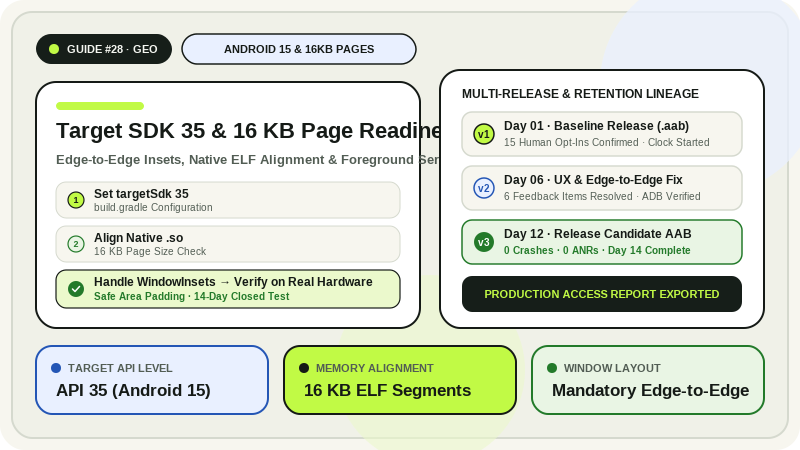
Google Play enforces its annual Target API Level policy at the moment you upload your first Android App Bundle to an internal or closed testing track. Setting `compileSdk = 35` and `targetSdk = 35` in your Gradle configuration does far more than satisfy a static manifest check inside Play Console: it instructs the Android 15 OS runtime to deactivate legacy compatibility shims for your process.
Many solo developers and vibe coders bump `targetSdkVersion` from 34 to 35 ten minutes before generating their release `.aab`, only to discover during closed testing that their bottom checkout button is trapped behind the Android 3-button navigation bar or that their background sync service crashes with a `ForegroundServiceStartNotAllowedException`.
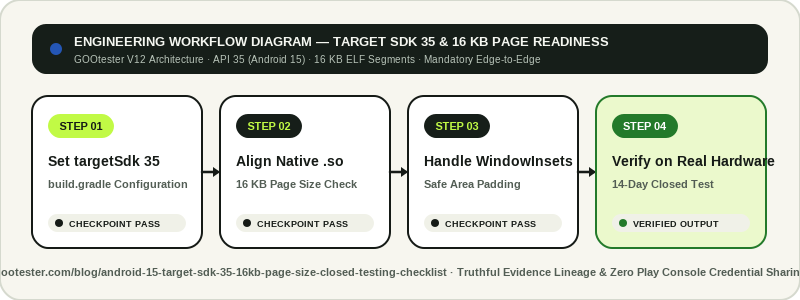
Because changing core window layout behavior or native NDK packaging midway through a 14-day closed test requires re-verifying every screen across your tester cohort, you should complete a structured API 35 compatibility pass before Day 1.
| Android 15 / Play Requirement | Technical Impact When targetSdk = 35 | Common Failure Symptom in Closed Testing | Required Engineering Fix |
|---|---|---|---|
| Mandatory Edge-to-Edge UI | Window extends behind status & navigation bars | Top header or bottom CTA covered by system bars | Apply `WindowInsetsCompat.Type.systemBars()` padding |
| 16 KB Memory Page Support | ARM64 `.so` ELF segments must align to `0x4000` | `UnsatisfiedLinkError: dlopen failed: empty/missing` | Use AGP 8.5.1+ & NDK r27+ (`-Wl,-z,max-page-size=16384`) |
| Foreground Service Timeouts | `dataSync` & `mediaProcessing` cap at 6 hours | `Service.onTimeout()` crash if `stopSelf()` omitted | Migrate to WorkManager or handle `onTimeout(int, int)` |
| Predictive Back Animations | System back animations enabled by default | Custom broken `onBackPressed()` interceptors fail | Migrate to `OnBackPressedCallback` / `BackHandler` |
2. Fixing Mandatory Edge-to-Edge Window Inset Overlaps in API 35
The single most visible bug reported by human closed testers on Android 15 handsets is broken edge-to-edge UI layout. Once an app targets API Level 35, Android 15 automatically forces your Activity window to draw edge-to-edge behind the top status bar, camera cutout (display notch), and bottom gesture or 3-button navigation bar. Legacy attributes like `Window.setStatusBarColor()` and `Window.setNavigationBarColor()` are ignored.
If your app relies on fixed top padding or assumes the root view starts below the status bar, human testers on devices with punch-hole cameras or 3-button navigation bars will find that they cannot tap your top back arrow or bottom submit button because the system bar intercepts the touch event.
In Jetpack Compose, wrap screens in `Scaffold` and consume its `innerPadding` parameter, or apply `Modifier.safeDrawingPadding()`. In XML Views, register a `ViewCompat.setOnApplyWindowInsetsListener` that reads `WindowInsetsCompat.Type.systemBars() or WindowInsetsCompat.Type.displayCutout()` and applies dynamic padding.
// Apply Android 15 (API 35) safe window insets to root container
ViewCompat.setOnApplyWindowInsetsListener(findViewById(R.id.root_container)) { view, windowInsets ->
    val insets = windowInsets.getInsets(
        WindowInsetsCompat.Type.systemBars() or WindowInsetsCompat.Type.displayCutout()
    )
    view.updatePadding(
        left = insets.left,
        top = insets.top,
        right = insets.right,
        bottom = insets.bottom
    )
    WindowInsetsCompat.CONSUMED
}
3. Verifying 16 KB Memory Page Size Alignment for Native .so Libraries
Historically, Android ran exclusively on 4 KB (`4096`-byte) virtual memory pages. Starting with Android 15, Google and flagship ARM64 silicon vendors introduced 16 KB (`16384`-byte) memory page size kernels, which boost app launch speed, reduce TLB misses, and improve camera and game frame throughput by 5% to 10%.
However, any app that bundles compiled C/C++ native shared libraries (`.so` files inside `lib/arm64-v8a/`)—which includes every Flutter, React Native, Expo, Unity, Godot, and SQLCipher app—will fail to load with a fatal `dlopen` crash on a 16 KB device if any `.so` library was compiled with 4 KB (`0x1000`) ELF `LOAD` segment alignment or packaged without 16 KB zip alignment.
To achieve full 16 KB compatibility, upgrade Android Gradle Plugin (AGP) to version `8.5.1` or newer (which automatically zip-aligns uncompressed shared libraries on 16 KB boundaries) and compile all NDK libraries with NDK `r27` or newer (or pass `-Wl,-z,max-page-size=16384` to the linker for NDK r26 and below).
# Check every arm64-v8a .so library for 16 KB (2**14 / 0x4000) ELF LOAD alignment
for so_file in app/build/intermediates/merged_native_libs/release/out/lib/arm64-v8a/*.so; do
  echo "Inspecting: $so_file"
  llvm-objdump -p "$so_file" | grep -E "LOAD.*align"
done
# Passing output must show: align 2**14 (or 2**16) — NEVER align 2**12
4. 16 KB Compatibility Versions for Flutter, React Native, Expo & Unity
Even if you did not write a single line of C++ code yourself, cross-platform frameworks ship precompiled `.so` binaries (`libflutter.so`, `libhermes.so`, `libreactnative.so`, `libunity.so`, `libil2cpp.so`) inside your Android App Bundle. If even one third-party native plugin ships an older 4 KB-aligned `.so` binary, the dynamic linker on a 16 KB Android device refuses to load it.
For Flutter developers, upgrade to Flutter `3.24+` (ideally `3.27+`) where `libflutter.so` and `libapp.so` default to 16 KB page alignment. For React Native and Expo developers, target React Native `0.76+` / Expo SDK `52+`, which compiles Hermes and the New Architecture Fabric/TurboModules binaries with 16 KB ELF alignment.
For Unity and Godot indie game developers, ensure you export from a patch release supporting Android 15 16 KB page alignment (`Unity 2022.3.48f1+` or `Unity 6000.0.23f1+`, and `Godot 4.3+`) and audit any third-party native audio (`libfmod.so`) or analytics `.aar` plugins before building your release `.aab`.
- Android Gradle Plugin (AGP): Upgrade to `8.5.1+` so `zipalign` aligns uncompressed `.so` entries on 16 KB boundaries automatically.
- Flutter SDK: Use Flutter `3.24+` / `3.27+` and update native plugins (camera, webview, sqlite, Sentry/Crashlytics NDK).
- React Native & Expo: Use React Native `0.76+` or Expo SDK `52+` with NDK `r27` enabled in `gradle.properties`.
- Unity & Godot Games: Upgrade to `Unity 2022.3.48f1+`, `Unity 6`, or `Godot 4.3+` and verify `libil2cpp.so` / `libgodot_android.so`.
5. Android 15 Foreground Service Timeouts and Boot Broadcast Restrictions
Android 15 also tightens background execution rules for apps targeting API Level 35. First, `dataSync` and `mediaProcessing` foreground services are now strictly limited to a total runtime of 6 hours within any 24-hour window. When the 6-hour limit expires, the system invokes `Service.onTimeout(int, int)`; if your service fails to call `stopSelf()` within a few seconds, Android throws a fatal `RemoteServiceException` crash.
Second, apps targeting Android 15 are prohibited from launching `dataSync`, `camera`, `mediaPlayback`, `phoneCall`, or `microphone` foreground services directly from a `BOOT_COMPLETED` BroadcastReceiver while running in the background.
unless your app genuinely requires a real-time user-visible ongoing notification (such as active turn-by-turn GPS navigation or continuous audio playback), migrate background uploads and periodic database syncs to Jetpack `WorkManager` (`CoroutineWorker`), which requires zero `FOREGROUND_SERVICE_*` manifest declarations and eliminates Play Console policy justification delays.
6. Running a Pre-Flight API 35 & 16 KB Audit Before Launching Closed Testing
Before you recruit 12 to 25 human testers or start your 14-day closed testing clock, inspect your compiled release `.aab` in Google Play Console's App Bundle Explorer (`Test and release -> App bundle explorer`). Play Console automatically displays whether your bundle targets API 35 and flags whether any bundled `.so` libraries fail 16 KB memory page alignment.
Next, run a physical-device ADB QA verification pass via GOOtester to inspect the actual rendered screenshots, status/navigation bar inset spacing, and logcat output during cold start and primary screen transitions.
Entering Day 1 of your closed test with a clean API 35, edge-to-edge-safe, 16 KB-aligned App Bundle ensures your human testers focus on real product feedback rather than blocked buttons or native linker crashes.
- Run bundletool & llvm-objdump Locally on Your Release .aab: Verify `targetSdkVersion: '35'` in the merged manifest and confirm `align 2**14` on all `arm64-v8a/*.so` libraries.
- Verify Edge-to-Edge Insets in Both Gesture and 3-Button Navigation Modes: Test on a physical device with 3-button bottom navigation enabled to ensure bottom CTAs and tab bars never overlap system buttons.
- Upload to Play Console Closed Track & Check App Bundle Explorer: Confirm zero API 35 or 16 KB alignment warnings in Play Console before inviting your 12-25 human closed testers.
Actionable Pre-Submission Verification Checklist
- Set `compileSdk = 35` and `targetSdk = 35` in `app/build.gradle` and verify zero deprecated manifest attributes remain.
- Test every screen in both gesture navigation and 3-button navigation modes on Android 15 to confirm edge-to-edge WindowInsets prevent UI overlap.
- Upgrade Android Gradle Plugin to `8.5.1+` and NDK to `r27+` so all uncompressed native `.so` libraries align to 16 KB (`0x4000`) boundaries.
- Run `llvm-objdump -p` on every `lib/arm64-v8a/*.so` file in your release bundle to ensure zero libraries still use `align 2**12` (4 KB).
- Replace `dataSync` foreground services and `BOOT_COMPLETED` service launches with Jetpack `WorkManager` tasks wherever possible.
- Migrate legacy `Activity.onBackPressed()` overrides to `OnBackPressedCallback` so Android 15 predictive back animations work smoothly.
Frequently Asked Questions
How do I know if my Flutter or React Native app has a 16 KB memory page size problem?
All Flutter, React Native, Expo, Unity, and Godot apps include native C/C++ `.so` libraries. Upload your `.aab` to Google Play Console and open App Bundle Explorer, or run `llvm-objdump -p` on your `lib/arm64-v8a/*.so` files. If any library shows `LOAD ... align 2**12` instead of `align 2**14`, upgrade your framework SDK and native plugins.
Why did my bottom navigation bar get covered by the Android system buttons after upgrading to targetSdk 35?
Android 15 (API Level 35) enforces edge-to-edge window rendering by default, drawing your app behind both the top status bar and bottom navigation bar. You must apply `WindowInsetsCompat.Type.systemBars()` padding (or Compose `Scaffold` `innerPadding` / Flutter `SafeArea`) to keep interactive controls clear of system bars.
Can I temporarily lower targetSdkVersion to 33 or 34 to skip edge-to-edge during closed testing?
No. Google Play Console blocks new app releases and production promotions that do not meet the current mandatory `targetSdkVersion 35` baseline. Fixing WindowInsets once before starting your 14-day closed test takes less than an hour and prevents rejection later.
What happens if a third-party SDK in my app still ships a 4 KB-aligned .so binary?
First check Maven Central or pub.dev/npm for an updated version of that SDK built with NDK r27. If the vendor has not updated it and you have source access, recompile with `-Wl,-z,max-page-size=16384`; otherwise replace the abandoned native plugin so your app does not crash with `UnsatisfiedLinkError` on 16 KB devices.