
1. How Android 16 AppFunctions Turn Indie Apps Into First-Class AI Tools
With Google Play requiring `targetSdk = 36` (Android 16) across 2026/2027 app submissions, the platform's marquee capability for indie productivity, tracker, note-taking, and commerce apps is **AppFunctions**. Historically, integrating with voice assistants required brittle legacy `actions.xml` App Actions or accessibility screen-scrapers. Android 16 replaces that patchwork with an OS-level `AppFunctionManager` broker backed by Jetpack `androidx.appfunctions` and Kotlin Symbol Processing (KSP).
At compile time, KSP inspects your `@AppFunction`-annotated methods and emits a machine-readable XML schema inside your `.aab` assets. When an opted-in user installs your app on an Android 16 handset, the OS indexes those schemas locally so system AI agents (such as Gemini on Android) can discover capabilities—like logging a workout or querying upcoming bills—and pass strongly typed parameters.
Unlike cloud-hosted Model Context Protocol (MCP) servers that require OAuth token round-trips over the public internet for purely local user state, Android 16 AppFunctions execute directly against your app's local Room SQLite database or authenticated repository layer on the device. That architecture keeps latency below a few hundred milliseconds, works completely offline in airplane mode for local-first utilities, and respects the user's on-device Android permission grants.
| Integration Mechanism | Execution Mode | Schema Discovery | Primary Closed Testing Failure Mode |
|---|---|---|---|
| Android App Links (HTTPS) | Opens foreground Activity UI | Domain `assetlinks.json` | Play App Signing SHA-256 fingerprint mismatch |
| Custom Explicit/Implicit Intents | Foreground or exported receiver | Static manifest filters | Android 15/16 stricter Intent-filter blocking |
| Android 16 AppFunctions | Headless typed RPC via OS broker | KSP-generated XML metadata | Missing `BIND_APP_FUNCTION_SERVICE` or R8 strip |
| Accessibility UI Scraping | Simulated screen taps | None (fragile layout tree) | Breaks on Compose semantics or edge-to-edge shifts |
2. Manifest Hardening: Enforcing BIND_APP_FUNCTION_SERVICE & R8 Parity
Exposing headless functions inside your app introduces an immediate security audit checkpoint—both for Google Play's automated vulnerability scanner (Play App Defense / ASI) and for real-world user safety. If you export an `AppFunctionService` *without* locking it down to the system signature permission `android.permission.BIND_APP_FUNCTION_SERVICE`, any arbitrary third-party app installed on the user's phone could bind directly to your service and invoke internal methods!
Verify your `AndroidManifest.xml` service declaration matches the exact system-guarded template below, and ensure R8 minification preserves KSP-generated `@AppFunctionSerializable` request/response classes in release `.aab` builds.
Pay special attention to ProGuard and R8 fullMode (`android.enableR8.fullMode=true`) in Gradle 8.x and 9.x builds: if KSP generates schema invoker adapters or Kotlin reflection metadata that is only referenced dynamically via Binder class names inside `app_functions_schema.xml`, aggressive shrinking can strip parameter fields unless you retain `@AppFunctionSerializable` data classes and test the compiled release `.aab` via `bundletool` before uploading to Play Console.
<service
    android:name=".agent.HabitTrackerAppFunctionService"
    android:permission="android.permission.BIND_APP_FUNCTION_SERVICE"
    android:exported="true">
    <intent-filter>
        <action android:name="android.app.appfunctions.AppFunctionService" />
    </intent-filter>
    <meta-data
        android:name="android.app.appfunctions"
        android:resource="@xml/app_functions_schema" />
</service>

<!-- ProGuard / R8 companion rule in app/proguard-rules.pro:
-keep @androidx.appfunctions.AppFunctionSerializable class * { *; }
-keep class * extends android.app.appfunctions.AppFunctionService { <init>(); }
-->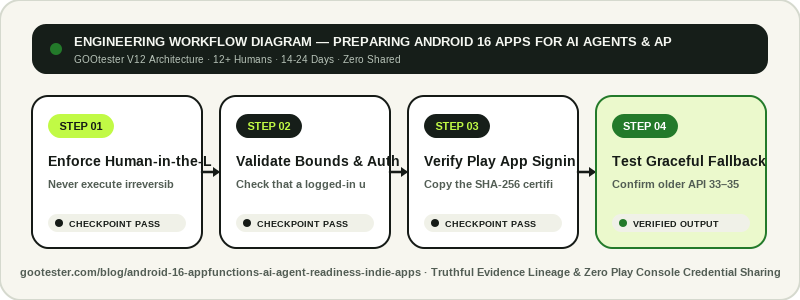
3. 4 AI-Readiness & Security Checks to Run During 14-Day Closed Testing
Because AI agent tool calls bypass your normal UI form validation (`EditText` max lengths, date pickers, button-disable states), every `@AppFunction` entrypoint must treat incoming arguments with the exact same zero-trust rigor as a public REST API.
Validate these four engineering invariants before promoting your Android 16 build from Closed Testing to Production.
- Enforce Human-in-the-Loop Confirmation for Destructive Actions: Never execute irreversible deletions, external messages, or payments silently in a headless AppFunction; return a verified Deep Link / PendingIntent for user confirmation.
- Validate Bounds & Auth State Inside Every @AppFunction: Check that a logged-in user session exists (handling logged-out states gracefully without `NullPointerException` crashes) and clamp string/numeric inputs.
- Verify Play App Signing SHA-256 in assetlinks.json: Copy the SHA-256 certificate from Play Console > Setup > App signing into `https://example.com/.well-known/assetlinks.json` so deep-link handoffs open natively.
- Test Graceful Fallback on Android 13–15 Devices: Confirm older API 33–35 handsets in your Closed Testing pool ignore Android 16 AppFunction services cleanly without `ClassNotFoundException` startup crashes.
4. Why Real-Device Closed Testing Catches AI & Deep-Link Edge Cases
Testing Android 16 features solely on a local Android Studio emulator misses two huge real-world variables: Play App Signing certificate re-signing (which breaks `assetlinks.json` auto-verification if you only pasted your debug SHA-256) and OEM background process management on Samsung One UI, Xiaomi HyperOS, and Pixel builds.
With GOOtester, you combine real human opt-in diversity via `testers@gootester.com` ($6 Basic 12 testers/14d, $12 Standard 15 testers/16d, $20 Premium 25 testers/24d) with standalone physical-device ARM64 ADB QA diagnostics in Standard and Premium—kept strictly separate from human opt-in counts—so crash traces and manifest misconfigurations surface well before Day 15.
Remember that Google Play alone decides Production Access, and GOOtester's service clock begins only after your Closed Testing track setup is verified live. Shipping a mid-cycle update during your 14-day test that refines deep-link routing, WindowInsets edge-to-edge padding, and AppFunction error boundaries gives you concrete, high-credibility engineering notes to cite in your Production Access application.
- Keep read-only query AppFunctions fast (< 1,500 ms) on background coroutines (`Dispatchers.IO`) to avoid ANRs.
- Verify generated `app_functions.xml` survives Gradle resource shrinking (`shrinkResources = true`).
- Disclose any server-side AI processing accurately inside your Play Console Data Safety form.
- Provide `reviewer-demo@example.com` in App Access if agent-linked deep links require login.
Actionable Pre-Submission Verification Checklist
- Guard every exported `AppFunctionService` with `android:permission="android.permission.BIND_APP_FUNCTION_SERVICE"`.
- Inspect your release `.aab` with `bundletool` to ensure R8 and `shrinkResources` keep AppFunction schemas intact.
- Handle unauthenticated/logged-out invocations with typed error responses rather than unhandled exceptions.
- Require explicit foreground user confirmation before executing destructive or financial actions.
- Publish Google Play App Signing's SHA-256 fingerprint inside `/.well-known/assetlinks.json`.
- Verify backward compatibility across Android 13, 14, 15, and 16 physical handsets during Closed Testing.
Frequently Asked Questions
Will adding Android 16 AppFunctions crash phones running Android 14 or Android 15?
No, provided you use Jetpack `androidx.appfunctions` compat APIs or guard platform `AppFunctionManager` calls with `Build.VERSION.SDK_INT >= 36`. Older OS versions simply ignore the uninvoked `<service>` intent filter.
Why does Google Play flag an exported service if I forget BIND_APP_FUNCTION_SERVICE?
An exported `<service>` without a signature/system permission allows any malicious app on the device to bind to it directly, creating an confused-deputy vulnerability flagged by Google Play security scans.
Do AppFunctions require an internet connection or cloud LLM API keys inside my app?
No! AppFunctions execute locally on the user's Android device via OS IPC (`Binder`), exposing your app's native domain logic to the system assistant without requiring you to bundle any LLM API keys.
How do I test Play-signed App Links and AppFunctions before public Production?
Upload your signed `.aab` to Internal or Closed Testing so Google Play re-signs it with your production App Signing key, verify `adb shell pm get-app-links com.example.app`, and run your 14-day human test.