1. 1. Why Android 12+ Silently Sends Broken App Links to Chrome
Passwordless magic-link emails, Stripe checkout return URLs, OAuth PKCE callbacks, and Trusted Web Activity (TWA) fullscreen shells all depend on **Android App Links**—verified `http`/`https` intent filters marked with `android:autoVerify="true"`. Prior to Android 12 (API 31), an unverified HTTPS intent filter still popped up an OS disambiguation sheet asking 'Open with YourApp or Chrome?'.
Modern Android (Android 12 through Android 15) abolished that fallback dialog. At install time, Android's `DomainVerificationManager` queries `https://<your-domain>/.well-known/assetlinks.json` via Google's Digital Asset Links proxy or direct HTTPS. If your installed APK's **SHA-256** signing certificate does not appear in that JSON array, Android routes every `https://<your-domain>/...` tap straight into Chrome—leaving your closed testers stranded on a mobile webpage after clicking a sign-in link.
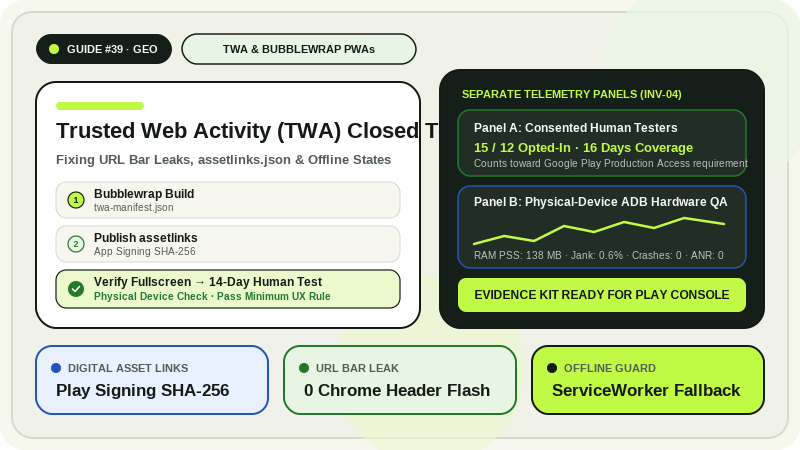
For PWA builders using Bubblewrap or PWABuilder (Trusted Web Activities), a missing Play App Signing `SHA-256` entry in `assetlinks.json` triggers an equally jarring symptom: Chrome displays a persistent top URL address bar across every screen of your Closed Testing build, prompting Google Play reviewers to reject the app as a generic WebView wrapper.
| Symptom Seen by Closed Testers | Underlying Verification State | Primary Root Cause |
|---|---|---|
| Magic-link email opens website in Chrome instead of app | Domain state: 1024 (legacy_failure) or none | Play App Signing SHA-256 missing from assetlinks.json |
| TWA app displays visible Chrome URL bar at top of screen | Digital Asset Links origin check failed | Upload Key SHA-256 used instead of Play App Signing SHA-256 |
| Works on www.example.com but fails on example.com | HTTP 301/308 redirect on /.well-known path | Apex domain redirects assetlinks.json instead of serving 200 OK |
| adb get-app-links shows HTTP/TLS fetch failure | CDN / WAF blocked Google-Association-Service | Bot fight rule or missing Content-Type: application/json |
2. 2. Authoring a Multi-Fingerprint /.well-known/assetlinks.json
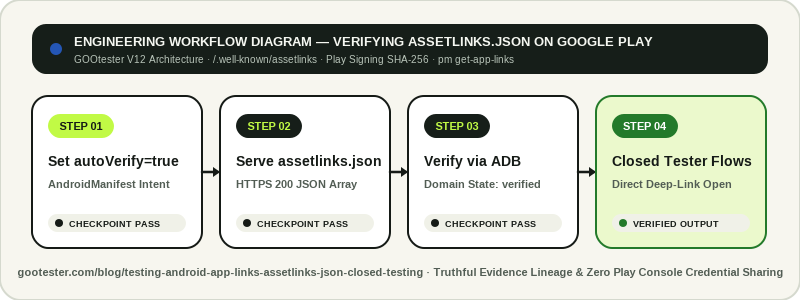
Just like Firebase OAuth requires SHA-1 registration, Digital Asset Links relies on uppercase colon-delimited **SHA-256** certificate fingerprints (`sha256_cert_fingerprints`). Fortunately, `sha256_cert_fingerprints` accepts an array of multiple strings within a single statement object—allowing local debug builds, sideloaded upload-key builds, and Google Play Closed Testing builds to verify against the exact same production file.
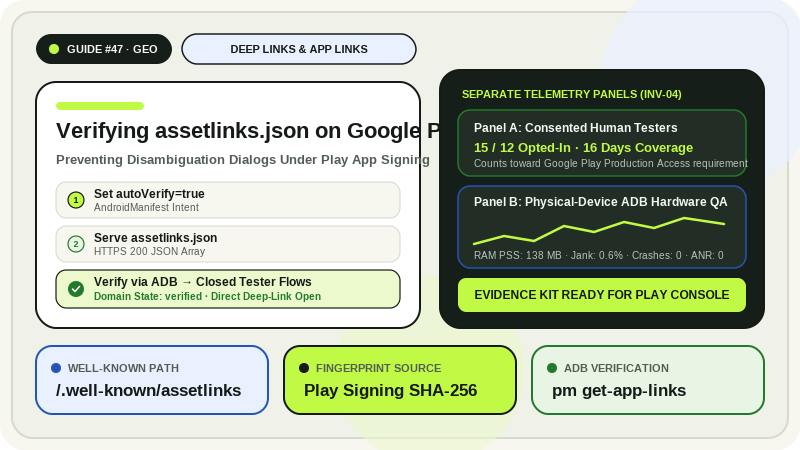
Open **Play Console > Test and release > Setup > App signing** (or **Grow > Deep links**), copy the 32-byte colon-separated **SHA-256 certificate fingerprint** under *App signing key certificate*, and append it to the `sha256_cert_fingerprints` array on your web host at `https://example.com/.well-known/assetlinks.json`.
Enforce strict HTTP transport rules on that endpoint: serve `200 OK` directly over TLS 1.2+ with `Content-Type: application/json; charset=utf-8`, zero `301`/`302`/`307`/`308` redirects (if your manifest lists both `example.com` and `www.example.com`, both hosts must return `200 OK` directly without redirecting `/.well-known/*`), and ensure Cloudflare or WAF bot rules allow `Google-Association-Service` unchallenged.
[
  {
    "relation": [
      "delegate_permission/common.handle_all_urls",
      "delegate_permission/common.get_login_creds"
    ],
    "target": {
      "namespace": "android_app",
      "package_name": "com.example.pulsefocus",
      "sha256_cert_fingerprints": [
        "14:6D:E9:83:C5:73:06:50:D8:EE:B9:95:2F:34:FC:64:16:A0:83:42:E6:1D:BE:A8:8A:04:96:B2:3F:CF:44:E5",
        "FA:C6:17:45:DC:09:03:78:6F:B9:ED:E6:2A:96:2B:39:9F:73:48:F0:BB:6F:89:9B:83:32:66:75:91:03:3B:9C"
      ]
    }
  }
]
3. 3. Hardening AndroidManifest Intent Filters & Play Console Deep Links
Inside `AndroidManifest.xml`, every App Link `<intent-filter android:autoVerify="true">` must include all three required elements: `android.intent.action.VIEW`, `android.intent.category.DEFAULT`, and `android.intent.category.BROWSABLE`, paired with explicit `http` and `https` `<data>` schemes.
Remove unreachable `staging.example.com` or `localhost` hosts from your `release` build manifest using Gradle `manifestPlaceholders` or build-type overlays. Leaving internal development domains inside an `autoVerify` block pollutes domain verification reports and creates confusing failure alerts inside Play Console.
After uploading your `.aab` to Closed Testing, inspect **Play Console > Grow > Deep links**. Google Play automatically crawls your declared manifest domains, validates `assetlinks.json` against your live Play App Signing certificate, and even generates a one-click copyable JSON patch if your Play SHA-256 is missing!
<activity
    android:name=".MainActivity"
    android:exported="true"
    android:launchMode="singleTask">

    <intent-filter android:autoVerify="true">
        <action android:name="android.intent.action.VIEW" />
        <category android:name="android.intent.category.DEFAULT" />
        <category android:name="android.intent.category.BROWSABLE" />

        <data android:scheme="https" />
        <data android:scheme="http" />
        <data android:host="app.example.com" />
        <data android:pathPrefix="/auth/callback" />
        <data android:pathPrefix="/invite" />
    </intent-filter>
</activity>
4. 4. Auditing Domain Verification State on Physical Devices via ADB
Because Android caches domain verification results at package installation time, deploying a fixed `assetlinks.json` to your web server will not immediately flip an already-installed phone from `1024` (`legacy_failure`) to `verified` until the background re-verifier runs—unless you trigger re-verification explicitly via `adb`.
Connect a physical Android 12–15 device that installed your Closed Testing build from Google Play and run `adb shell pm verify-app-links --re-verify <package>` followed by `adb shell pm get-app-links <package>`. Within five seconds, the Domain Verification service fetches your live JSON and prints the authoritative status for every host.
Once every production host reports `verified`, fire a synthetic `VIEW` intent over `adb` (`adb shell am start -W -a android.intent.action.VIEW -d "https://app.example.com/invite/test"`) to confirm your activity wakes in `singleTask` mode without launching Chrome.
- Validate Live HTTPS Headers with curl -I: Run curl -i https://app.example.com/.well-known/assetlinks.json to confirm HTTP/2 200 and Content-Type: application/json with zero 3xx Location headers.
- Trigger pm verify-app-links --re-verify: Force Android's DomainVerificationManager to re-evaluate your Play-signed APK against the updated SHA-256 list.
- Confirm 'verified' State & Cold-Start Deep Link Routing: Kill the app process first, then run am start -a VIEW to confirm cold-boot deep link routing works just as reliably as warm-state routing.
#!/usr/bin/env bash
set -euo pipefail

PKG="com.example.pulsefocus"

# 1. Force Android Package Manager to re-fetch /.well-known/assetlinks.json
adb shell pm verify-app-links --re-verify "$PKG"
sleep 4

# 2. Inspect per-domain verification state (expect: app.example.com: verified)
adb shell pm get-app-links "$PKG"

# 3. Dispatch real deep-link intent without specifying package name
adb shell am start -W -a android.intent.action.VIEW \
  -c android.intent.category.BROWSABLE \
  -d "https://app.example.com/auth/callback?code=smoke_check"
5. 5. Framework Traps Across TWA, Expo Router & Capacitor
Cross-platform frameworks add one extra layer between Android's `Intent` delivery and your UI router. Setting `android:launchMode="singleTask"` (or `singleTop` with `onNewIntent` forwarding) is critical; otherwise, clicking a magic link opens a duplicate second task stack on top of your existing app instance.
In **Expo (React Native)**, verify that `android.intentFilters` inside `app.json` sets `"autoVerify": true`, and test cold-start URL retrieval via `Linking.useURL()` from `expo-linking`. In **Capacitor**, ensure `App.addListener('appUrlOpen', ...)` is registered early at root initialization so cold-boot auth tokens are never dropped before the WebView finishes hydrating.
In **Bubblewrap / Trusted Web Activities**, also run `./gradlew bundleRelease` after updating `twa-manifest.json` `fingerprints` if your local asset descriptor cache references stale hashes, and verify zero URL bar visibility across physical devices.
- TWA / Bubblewrap: Missing Play App Signing SHA-256 causes Chrome Custom Tabs fallback with a visible top address bar.
- Expo Router: Adding `intentFilters` to `app.json` modifies native `AndroidManifest.xml`—requiring a full `eas build` `.aab`, not just an OTA `eas update`.
- Capacitor: Override `onNewIntent` properly (handled in modern `BridgeActivity`) and test both cold-terminated and backgrounded deep-link resumption.
- Credential Manager Passkeys: Including `delegate_permission/common.get_login_creds` in the same `assetlinks.json` unlocks seamless Android passkey autofill.
6. 6. Verifying Asset Links Before Inviting Your 12 Closed Testers
Because updating `/.well-known/assetlinks.json` is purely a web-server deployment, you can publish your Play App Signing `SHA-256` fingerprint to production the moment Play Console initializes your app—even while your initial Closed Testing release is still `In review`!
That proactive sequence guarantees that when your Closed Testing track flips to `Available to testers` and you add `testers@gootester.com` via Google Groups, every single tester's device verifies your domain cleanly at first install (`verified` on Day 1).
Seamless magic-link login and deep-link navigation mean higher multi-screen tester retention, cleaner Android Vitals session logs, and zero 'Broken Functionality' surprises when you submit for Production Access after Day 14.
Actionable Pre-Submission Verification Checklist
- Copy the uppercase colon-separated SHA-256 fingerprint under 'App signing key certificate' in Play Console > Setup > App signing.
- Publish /.well-known/assetlinks.json containing Debug, Upload, and Play App Signing SHA-256 fingerprints on every manifest host.
- Confirm curl -i https://<domain>/.well-known/assetlinks.json returns HTTP 200 OK directly with Content-Type: application/json and zero redirects.
- Remove staging or localhost host entries from release AndroidManifest.xml autoVerify intent-filters.
- Verify Play Console > Grow > Deep links reports zero domain verification or manifest configuration errors.
- Run adb shell pm get-app-links <package> on a Play-installed physical device to confirm 'verified' status before inviting testers@gootester.com.
Frequently Asked Questions
Does assetlinks.json use SHA-1 or SHA-256 from Google Play App Signing?
Android Digital Asset Links strictly uses uppercase colon-separated SHA-256 certificate fingerprints (sha256_cert_fingerprints). Putting a shorter 20-byte SHA-1 fingerprint into assetlinks.json causes domain verification to fail silently.
Do I have to upload a new .aab if I forgot to add the Play App Signing SHA-256 to my website's assetlinks.json?
No—as long as your AndroidManifest.xml already includes android:autoVerify="true" and the correct https host, deploying the updated /.well-known/assetlinks.json to your web server fixes domain verification for all new installs (and periodic background re-checks) without rebuilding your app.
Why does adb shell pm get-app-links show status code 1024 on my Closed Testing build?
Status code 1024 (legacy_failure) means Android fetched your /.well-known/assetlinks.json or encountered an HTTP redirect/error and could not match the installed APK's SHA-256 signature. Check for apex-to-www 301 redirects, WAF bot blocks, or using your Upload Key instead of your Play App Signing Key.
Why is my PWA / Trusted Web Activity showing a Chrome address bar in Closed Testing?
Trusted Web Activities hide the browser UI only when bidirectional Digital Asset Links verification succeeds. Add your Play App Signing SHA-256 fingerprint to /.well-known/assetlinks.json on the exact startUrl origin so Chrome validates ownership and enters fullscreen mode.