1. The Golden Timing Rule: Never Pause Before Production Is Live
Crossing Day 14 on Play Console's dashboard unlocks the Apply for production button, tempting many developers to immediately clean house by pausing their Closed Testing track or deleting `testers@gootester.com`. Doing so prematurely is a costly mistake: Production Access applications undergo human review that typically takes 24 hours to 7 days, during which reviewers inspect your live Closed Testing track state.
Wait until two distinct milestones complete in order: first, Google Play formally grants **Production access**; second, you promote or upload a release to the **Production** track and its status turns green (`Available on Google Play`). That exact review buffer is why GOOtester's Standard ($12 for 16 days) and Premium ($20 for 24 days) plans include extra continuity days past Day 14.
| Post-Approval Action | Public Reviews Enabled? | Tester Update Path | Recommended When |
|---|---|---|---|
| Pause Closed Track (after Prod is live) | Yes — public stars unlocked | Seamless migration to Production | Default choice for most indie launches |
| Keep Closed Track Active (same versionCode) | No — opted-in users send private feedback | Receives highest eligible versionCode | Running continuous external beta cohorts |
| Pause Closed Track BEFORE Prod approval | N/A — app not public yet | Halts closed track availability | Never — risks failing Production review |
| Remove Google Group Only (track left active) | Partial — prior opt-ins stay flagged beta | Confusing split state for opted-in users | Avoid — Pause Track is cleaner |
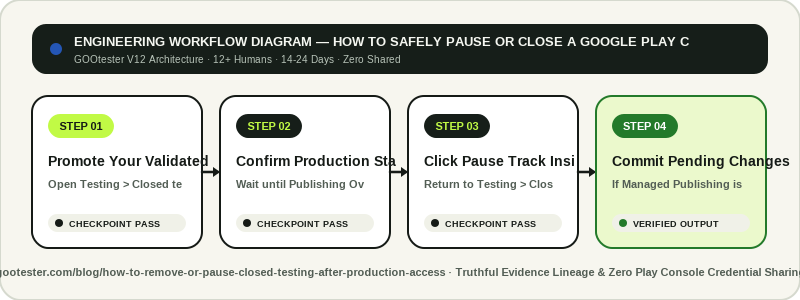
3. Step-by-Step: Promoting to Production and Pausing Closed Testing
Note that Google Play Console intentionally prohibits deleting a historical testing track permanently because release audit logs, `mapping.txt` deobfuscation files, and historical Android Vitals metrics remain indexed against that track ID. Instead, **Pause track** is Google's official lifecycle mechanism to retire a closed track cleanly.
Follow this exact four-step sequence inside Play Console so zero early users end up stranded on an outdated binary and Publishing Overview processes the transition without conflicts.
- Promote Your Validated Closed AAB to Production: Open Testing > Closed testing > Manage track, click Promote release > Production on your highest stable versionCode, and submit for review.
- Confirm Production Status Reaches 'Available on Google Play': Wait until Publishing Overview confirms your Production release is approved and live (not merely 'In review' or 'Ready to publish').
- Click Pause Track Inside Closed Testing: Return to Testing > Closed testing > Manage track, click Pause track in the upper-right header, and confirm the track status change.
- Commit Pending Changes in Publishing Overview: If Managed Publishing is enabled, open Publishing Overview and publish the track pause so the Play Store drops beta routing worldwide.
4. Reusing Your Paused Track Later for Major v2.0 Architectural Updates
Because pausing a track is non-destructive, you can click **Resume track** months later whenever you need to test a risky migration—such as upgrading `targetSdk`, swapping local SQLite storage, or refactoring Play Billing subscriptions—before exposing public Production users.
Remember that Google Play alone decides Production Access for each new app, and GOOtester never fabricates Play Store reviews or ratings. Once your app graduates to public Production, pausing your closed track simply ensures genuine organic users can rate your public listing normally.
- Keep your Closed Testing track untouched until Production status is officially live on Google Play.
- Check Publishing Overview so a paused track change does not sit uncommitted under Managed Publishing.
- Detach `testers@gootester.com` after pausing if you want your future resumed track restricted to VIP users.
- Use Internal Testing (up to 100 emails, instant rollout) for everyday post-launch developer hotfix checks.
Actionable Pre-Submission Verification Checklist
- Wait for formal Production Access approval before modifying any Closed Testing settings.
- Promote your validated Closed Testing AAB to Production so versionCode parity is guaranteed.
- Confirm the Production track shows 'Available on Google Play' in Play Console.
- Click Pause track inside your Closed Testing track settings rather than uploading empty releases.
- Publish any queued changes inside Publishing Overview if Managed Publishing is active.
- Verify on a non-developer phone that your Play Store listing displays without the '(Beta)' suffix.
Frequently Asked Questions
Can I permanently delete the default Alpha Closed Testing track in Play Console?
No. Google Play Console retains historical tracks permanently for release auditing and symbol deobfuscation, but clicking Pause track completely disables new closed opt-ins and stops closed-track binary delivery.
What happens to existing testers on their phones when I pause Closed Testing?
Their installed app is not uninstalled or wiped. Provided your Production versionCode is equal to or greater than their installed Closed Testing versionCode, they seamlessly transition onto your public Production update stream.
Should I remove testers@gootester.com on Day 14 right before applying for Production?
Never! Removing your tester group or pausing the track before Production Access is reviewed and approved can invalidate your active testing state during manual review. Wait until Production is approved and live.
Why couldn't my friend leave a public review while my app was in Closed Testing?
Google Play converts all ratings from Closed Testing participants into private developer feedback. Once Production is live and you pause the Closed Testing track (or they leave beta), public reviews unlock.