1. 1. Why `assembleDebug` Misses Bugs That Crash Your Release `.aab`
Countless Android launches stumble on Day 1 of Closed Testing when an app that ran flawlessly for weeks via Android Studio's green **Run** button crashes within two seconds of opening from Google Play. The root cause is architectural: Android Studio's iterative Run workflow deploys debuggable builds (`assembleDebug`) with code shrinking disabled, whereas Google Play requires a release-signed Android App Bundle (`bundleRelease`).
Inside a release `.aab`, R8 full-mode optimization (`isMinifyEnabled = true`) strips unused classes and renames reflection targets, `isShrinkResources = true` purges seemingly unreferenced drawables, and Google Play's bundle compiler slices your binary into modular **Split APKs** by CPU ABI (`arm64-v8a`), pixel density (`xxhdpi`), and spoken language (`en`, `es`, `ja`).
Because Android's `PackageManager` cannot install a raw `.aab` file over `adb install app-release.aab`, developers often upload blind to Play Console and wait up to 48 hours for track review—only to pollute their Android Vitals crash rate immediately. Google's open-source `bundletool` utility eliminates that blind spot locally in under sixty seconds.
2. 2. Installing `bundletool` & Running `build-apks` with Your Upload Keystore
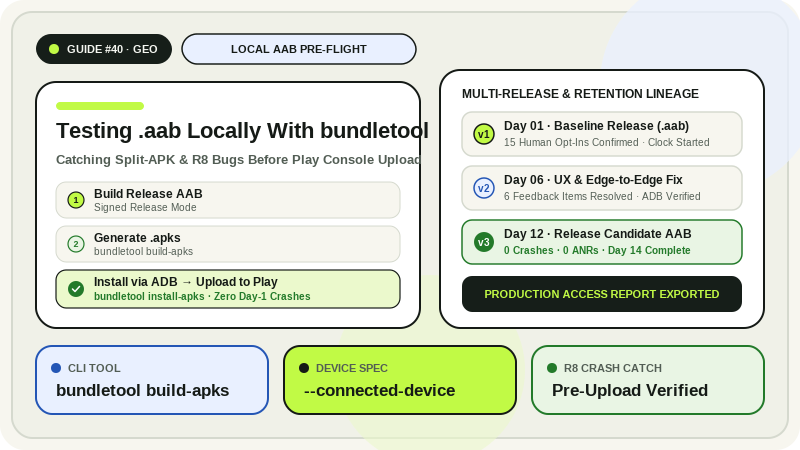
On macOS and Linux workstations, install `bundletool` via Homebrew (`brew install bundletool`) or download the standalone `bundletool-all.jar` release from Google's official Android GitHub repository and invoke it with `java -jar bundletool-all.jar`. Next, compile your production bundle from the project root using `./gradlew :app:bundleRelease`, outputting `app/build/outputs/bundle/release/app-release.aab`.
Convert the `.aab` into an `.apks` split-APK container archive using `bundletool build-apks`. Always pass your release/upload keystore flags (`--ks`, `--ks-key-alias`, `--ks-pass`, `--key-pass`). If you omit `--ks`, `bundletool` silently falls back to `~/.android/debug.keystore`, which alters your runtime signature hash and prevents accurate validation of Google Sign-In, Firebase Auth, Maps SDK keys, or TWA Digital Asset Links.
For rapid single-phone testing while a handset is plugged in via USB debugging, append `--connected-device` so `bundletool` compiles only the exact split combinations needed by that specific hardware rather than every possible permutation across 80 locales and 4 CPU architectures.
./gradlew clean :app:bundleRelease

bundletool build-apks \
  --bundle=app/build/outputs/bundle/release/app-release.aab \
  --output=build/release-splits.apks \
  --ks=keystore/upload-key.jks \
  --ks-key-alias=upload \
  --ks-pass=env:UPLOAD_STORE_PASSWORD \
  --key-pass=env:UPLOAD_KEY_PASSWORD \
  --connected-device \
  --overwrite

bundletool install-apks --apks=build/release-splits.apks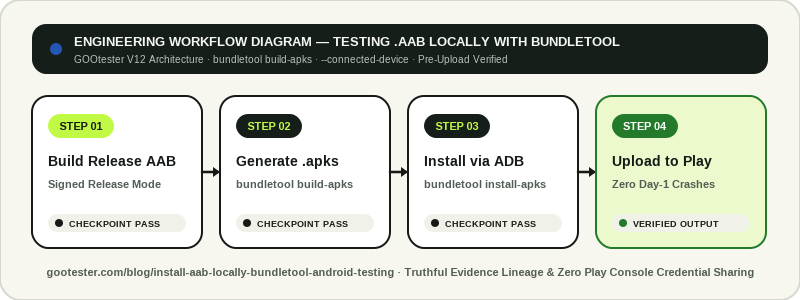
3. 3. Simulating Exact Hardware Profiles with `get-device-spec` & `install-apks`
When debugging device-specific issues—such as a tester reporting missing icons on a `320dpi` budget handset or a crash when the OS language switches to French—you do not even need the physical phone tethered during compilation. Run `bundletool get-device-spec --output=pixel-spec.json` on an attached device or craft a JSON device specification file defining `supportedAbis`, `supportedLocales`, `screenDensity`, and `sdkVersion`.
Passing `--device-spec=pixel-spec.json` to `bundletool extract-apks` unpacks the exact subset of split `.apk` files (`base-master.apk`, `base-arm64_v8a.apk`, `base-xxhdpi.apk`, `base-fr.apk`) that Google Play's CDN would deliver over the air. You can then inspect the merged `AndroidManifest.xml` via `bundletool dump manifest --bundle=app-release.aab` or check download payload size with `bundletool get-size total --apks=release-splits.apks`.
If your app uses Play Asset Delivery or Play Feature Delivery on-demand modules, add the `--local-testing` flag during `build-apks`. That flag instructs the Play Core library to sideload dynamic splits from local external storage via ADB, letting you test on-demand module installation offline before touching Play Console.
| Command Flag | Generated Artifact | Fidelity to Google Play Delivery | Best Engineering Use Case |
|---|---|---|---|
| Default (no mode flag) | Full matrix .apks archive | 100% identical split slicing | CI artifact archiving & multi-device matrix QA |
| --connected-device | Targeted splits for USB phone | 100% identical for attached phone | Fast local developer pre-flight verification |
| --local-testing | Splits + local Play Core hook | Simulates dynamic module fetches | Play Feature Delivery & Asset Pack testing |
| --mode=universal | Single monolithic fat APK | Low (merges all splits into one) | Ad-hoc non-Play distribution only; hides split bugs |
4. 4. Top 5 Release-Only Defects Caught Locally by `bundletool`
First and most destructive is **R8 reflection stripping**: Retrofit DTOs, Gson models, Kotlinx Serialization classes, or JNI callbacks lacking `@Keep` rules or `proguard-rules.pro` entries throw `NullPointerException` or `ClassNotFoundException` only in minified release builds. Watching `adb logcat *:E` while clicking through your `install-apks` build exposes missing keep rules immediately.
Second is **in-app language picker crashes**: apps that offer custom in-app locale switching without configuring `androidResources { generateLocaleConfig = true }` or `BundleConfig` language retention crash with `Resources$NotFoundException` because Play strips non-system locale splits by default.
Third through fifth include **16 KB ELF alignment failures** on ARM64 native `.so` libraries required by Android 15/16, **cleartext HTTP traffic blocks** when release configurations switch endpoints without proper `networkSecurityConfig`, and **WebView asset stripping** in Capacitor/Flutter/React Native hybrids.
- Always test cold boot, login, deep links, and payment/onboarding screens on the `install-apks` release build while capturing `adb logcat -b crash`.
- Switch device system language and dark mode after `install-apks` to verify split resource availability without universal-APK masking.
- Verify `zipalign -c -P 16 -v 4 base-arm64_v8a.apk` on extracted native splits so Android 15/16 devices never reject native libraries.
5. 5. Local `bundletool` CLI vs. Play Console Internal App Sharing
While `bundletool` reproduces Google Play's split-APK slicing locally in seconds, remember one key difference: `bundletool` signs splits with your **Upload Key**, whereas live Closed Testing and Production tracks re-sign splits in the cloud with your **Google Play App Signing Key**. If you forgot to register the Play App Signing SHA-1 / SHA-256 certificate in Firebase Console or Google Cloud Console OAuth credentials, Google Sign-In will succeed on your local `bundletool` build yet fail on Closed Testing.
The gold-standard pre-flight workflow combines both tools sequentially. First, iterate rapidly offline using `bundletool build-apks` + `install-apks` until zero R8, layout, or split-resource errors remain. Second, upload the verified `.aab` to Play Console's **Internal testing** track (or **Internal app sharing**), which unlocks in minutes with zero review wait and delivers a binary signed by the real cloud Play App Signing certificate.
Once one test login on that cloud-signed Internal build succeeds end-to-end, promote that exact battle-tested `.aab` artifact directly to your **Closed testing** track with complete confidence.
6. 6. Promoting Your Verified `.aab` into a 14-Day Closed Test with GOOtester
Starting your 14-day closed testing cycle with a `bundletool`-verified `.aab` transforms the entire two-week sprint from emergency firefighting into calm, methodical release engineering. Instead of burning Days 1 through 4 debugging broken ProGuard rules while testers bounce off startup crashes, every tester installation registers clean sessions in Android Vitals.
Inside Play Console, promote your verified release to your active Closed Testing track, set **Countries / regions** to **All Countries**, and bind `testers@gootester.com` under **Testers > Google Groups**—never sharing passwords, service-account JSON keys, or your `.jks` upload keystore. If you want deeper automated telemetry alongside your own local `bundletool` runs, GOOtester also offers standalone physical-device ADB QA diagnostics kept strictly separate from human tester recruitment.
Select the compliance buffer that matches your launch risk profile—**$6 Basic** (12 real human testers / 14 days), **$12 Standard** (15 real human testers / 16 days), or **$20 Premium** (25 real human testers / 24 days). Your clock begins only after Play Console approves the track and testers opt in, backed by our 100% Approval Guarantee.
- Verify Locally with bundletool install-apks: Compile bundleRelease, generate device-matched splits signed with your upload keystore, and verify zero crash logs over ADB.
- Confirm Cloud Signature via Internal Testing: Upload the .aab to Internal Testing first to confirm OAuth, Maps, and Play App Signing SHA-256 certificates match in production.
- Promote to Closed Testing & Bind testers@gootester.com: Promote the verified AAB to Closed Testing, enable global regions, save testers@gootester.com under Google Groups, and launch your 14-day cycle.
Actionable Pre-Submission Verification Checklist
- Install bundletool via Homebrew or official GitHub release JAR and verify ./gradlew :app:bundleRelease completes cleanly.
- Always pass --ks and --ks-key-alias when running bundletool build-apks so splits are not silently signed with a debug keystore.
- Test real split slicing with --connected-device or --device-spec rather than relying exclusively on --mode=universal fat APKs.
- Monitor adb logcat -b crash during cold boot and core flows on the installed split APKs to catch R8/ProGuard reflection bugs early.
- Confirm both Upload Key and Play App Signing SHA-1/SHA-256 hashes are registered in Firebase, Google Cloud OAuth, and assetlinks.json.
- Promote the verified .aab to Closed Testing, bind testers@gootester.com via Google Groups, and retain your .apks script for mid-cycle updates.
Frequently Asked Questions
Why do I get 'Invalid APK file' when running adb install app-release.aab?
An .aab (Android App Bundle) is a publishing archive designed for Google Play's build servers, not an installable Android package. You must run bundletool build-apks to compile device-specific split APKs (.apks) and then deploy them over USB using bundletool install-apks.
Should I use bundletool --mode=universal to test my app before Closed Testing?
Only use --mode=universal if you need a single sideloadable APK for non-Play distribution. For Google Play pre-flight QA, omit --mode=universal (or use --connected-device) so bundletool exercises real ABI, density, and language split APKs identically to Google Play.
Why did Google Sign-In work via bundletool install-apks on my phone, yet fail with ApiException: 10 on Closed Testing?
Local bundletool builds use your Upload Keystore SHA-1, whereas Play Console Closed Testing re-signs your app with Google Play App Signing's cloud key. Copy the App Signing SHA-1 fingerprint from Play Console > Setup > App integrity and add it to your Google Cloud / Firebase OAuth client.
Does GOOtester ever need my .aab file or upload keystore to run the 14-day closed test?
No—never send your .jks keystore or Play Console credentials to third parties for closed testing compliance. For human closed testing, you upload your .aab directly to Play Console yourself, add testers@gootester.com under Google Groups, and share only your public Web Opt-In URL.