1. Closed Testing Groups vs. License Testing: Solving the Real-Money Trap
One of the most expensive misunderstandings in Play Console happens when a developer activates a $9.99/month subscription, adds `testers@gootester.com` to their Closed Testing track, and assumes every tester automatically gets Google's sandbox test card. **They do not.** Closed Testing track membership only authorizes downloading the app binary; anyone *not* listed individually under **Setup > License testing** is prompted by Google Play to charge their real personal credit card!
External human testers will understandably exit a hard paywall rather than paying real money to test an unreleased app—hurting your session depth during your 14-day window. Keep your app free to download during Closed Testing, add your own internal QA email (`developer@example.com`) to **License testing** to exercise `Test card, always approves`, and provide a generous free tier, Play Promo Codes, or an unlocked demo login (`reviewer-demo@example.com`) so external closed testers and Google reviewers can explore premium screens without payment friction.
| Production Billing Period | License Tester Sandbox Duration | Max Auto-Renewals | Hold / Grace Period in Sandbox |
|---|---|---|---|
| 1 Week | 3 minutes | Up to 6 renewals | 5 to 10 minutes compressed |
| 1 Month | 5 minutes | Up to 6 renewals | 5 to 15 minutes compressed |
| 3 Months / 6 Months | 10 to 15 minutes | Up to 6 renewals | 5 to 15 minutes compressed |
| 1 Year | 30 minutes | Up to 6 renewals | 10 to 30 minutes compressed |
2. Play Billing Library v7/v8 Setup & The 3-Day Auto-Refund Trap
Google Play enforces strict annual deprecations on legacy Play Billing versions; new 2026/2027 Closed Testing uploads should compile against Play Billing Library `7.1.1+` or `8.x` (`com.android.billingclient:billing-ktx`). Modern versions replace the deprecated boolean `enablePendingPurchases()` with typed `PendingPurchasesParams` and streamline service reconnection handling.
During closed testing with your License Tester account, watch out for the classic **5-minute disappearance bug**: if your app unlocks Pro UI after `onPurchasesUpdated` returns `BillingResponseCode.OK` without calling `acknowledgePurchase` (or server-side `purchases.subscriptionsv2.acknowledge`), Google Play automatically refunds and cancels the test purchase—often within minutes in sandbox and strictly within 72 hours in production!
val pendingParams = PendingPurchasesParams.newBuilder()
    .enableOneTimeProducts()
    .build()

val billingClient = BillingClient.newBuilder(context)
    .setListener(purchasesUpdatedListener)
    .enablePendingPurchases(pendingParams)
    .enableAutoServiceReconnection()
    .build()

suspend fun verifyAndAcknowledgeOnBackend(purchase: Purchase) {
    if (purchase.purchaseState == Purchase.PurchaseState.PURCHASED && !purchase.isAcknowledged) {
        // Send purchase.purchaseToken to your backend -> Play Developer API v2 verification
        backendApi.confirmEntitlement(purchaseToken = purchase.purchaseToken)
    }
}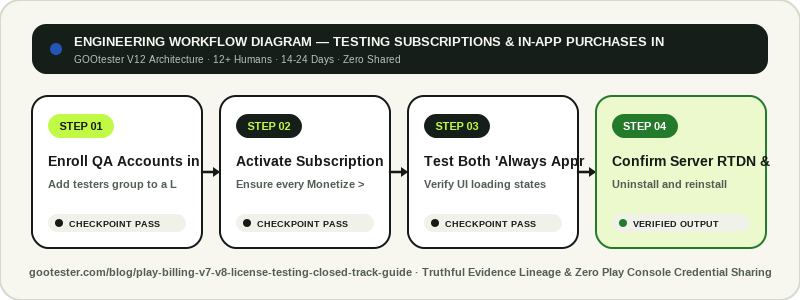
3. 4-Step Sandbox Billing QA Workflow Before Applying for Production
Note an essential Play Console dependency: `queryProductDetailsAsync` returns an empty product list until your `.aab` containing the `com.android.vending.BILLING` permission is uploaded to Internal or Closed Testing, your Base Plan / Offer is set to **Active**, and your tester Google account is opted into the track on the primary Play Store account of the device.
Execute these four checks with your `developer@example.com` License Tester account while your external human cohort runs in parallel.
- Enroll QA Accounts in Setup > License Testing: Add developer@example.com to a License Testers list, set License response to RESPOND_NORMALLY, and save changes in Play Console.
- Activate Subscription Base Plans Before Querying: Ensure every Monetize > Subscriptions or In-app products SKU has an Active base plan and regional pricing synced across enabled countries.
- Test Both 'Always Approves' and 'Slow / Declines' Instruments: Verify UI loading states on slow pending purchases and verify payment recovery banners using 'Test card, declines after first renewal'.
- Confirm Server RTDN & Restore Purchases on Reinstall: Uninstall and reinstall the Closed Testing build to confirm `queryPurchasesAsync` restores active entitlements cleanly on fresh installs.
4. Avoiding Hard-Paywall Rejections During Closed Testing & App Review
If your app puts 100% of its screens behind a mandatory subscription paywall on screen #1, two things go wrong: external closed testers cannot explore any core features beyond the paywall screen, and Google Play's App Access reviewers reject the submission if they cannot inspect post-paywall functionality.
Solve both cleanly: allow free exploration of core non-destructive screens (or grant a server-controlled demo entitlement to `reviewer-demo@example.com` documented inside **App content > App access**). Pair that smooth UX with GOOtester's $6 Basic (12 testers / 14d), $12 Standard (15 testers / 16d + ADB QA), or $20 Premium (25 testers / 24d + ADB QA) package so testers exercise real application depth.
- Verify `com.android.vending.BILLING` is present in your merged release `AndroidManifest.xml`.
- Clear Play Store app cache if newly added License Tester accounts still show real credit cards.
- Generate Play Console **Promo codes** if you want select external beta testers to redeem an SKU free.
- Verify transparent cancellation and renewal price disclosures on your paywall screen.
Actionable Pre-Submission Verification Checklist
- Upgrade `com.android.billingclient:billing-ktx` to Play Billing Library v7.1+ or v8.x before uploading.
- Add your personal QA test account (`developer@example.com`) under Play Console > Setup > License testing.
- Set every Subscription Base Plan and one-time In-App Product to Active in Monetize settings.
- Verify `acknowledgePurchase` (or `consumeAsync`) completes so sandbox purchases do not auto-refund.
- Test declined renewals, pending purchases, and reinstall `queryPurchasesAsync` restoration.
- Provide a free tier or `reviewer-demo@example.com` unlocked account so closed testers never hit a real-money wall.
Frequently Asked Questions
Why is queryProductDetailsAsync returning an empty list on my local Android Studio build?
Google Play Billing requires your package name and signing certificate to match an uploaded Internal or Closed Testing release on Play Console, with Active products/base plans and an opted-in Google account signed into the device's Play Store.
Do members of testers@gootester.com automatically get free test credit cards?
No. Closed Testing Google Groups only unlock downloading the app from Google Play. Sandbox test cards require explicit inclusion in Setup > License testing, so always offer free features or demo access for external testers.
Why did my test subscription cancel itself 3 minutes after purchase?
Either you did not call `acknowledgePurchase` (sandbox unacknowledged purchases auto-refund rapidly) or the sandbox subscription reached its maximum of 6 accelerated renewals (30 minutes total for a monthly plan).
Can I test a paid-upfront ($2.99 download) app during 12-tester Closed Testing?
Google Play charges real money to non-License-Tester Closed Testing users on paid-upfront apps, and once an app is set to Free it cannot be changed back to Paid later. Most indie apps use Free download + Play Billing IAPs instead.