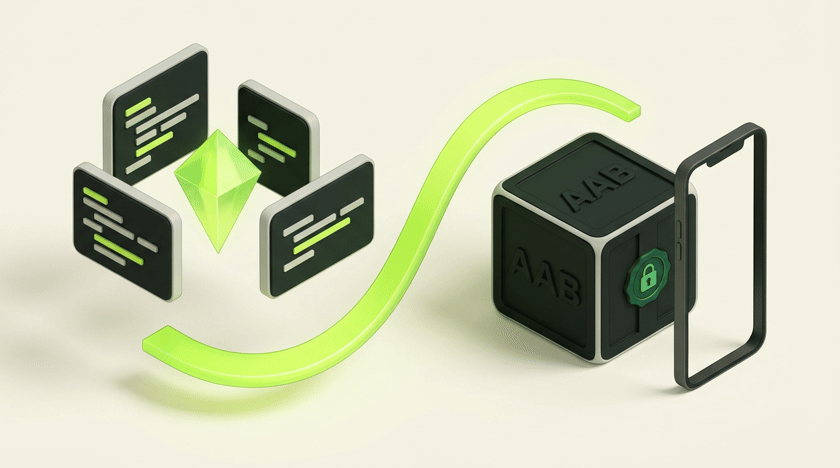
1. Capacitor Local Bundling vs. TWA: Best Packaging for Vibe-Coded MVPs
Browser-native AI builders like **Bolt.new**, **Lovable**, **Replit Agent**, and **Windsurf** generate clean React + Vite + TypeScript + Tailwind + Supabase applications in hours. The friction starts when you open Google Play Console and discover you need a Java/Kotlin keystore, `targetSdk = 36`, edge-to-edge system inset handling, and a signed `.aab` artifact.
While **Trusted Web Activities (TWA / Bubblewrap)** can wrap an existing PWA, TWAs fail Play review whenever Service Worker offline caching is incomplete or `/.well-known/assetlinks.json` drifts out of sync. Exporting your codebase to GitHub and wrapping your compiled `dist/` output with **Capacitor** packages HTML/JS/CSS directly inside the `.aab`, unlocks native SplashScreen, StatusBar, Haptics, and Play Billing plugins, and passes Google's offline cold-start check reliably.
| Browser Prototype Pattern | What Happens on Google Play | Required Android Release Fix |
|---|---|---|
| `VITE_OPENAI_API_KEY` in `.env` | Key extracted from APK `assets/public/*.js` in seconds | Proxy via Supabase Edge Function / Cloudflare Worker |
| OAuth redirect to `http://localhost:5173` | Login hangs on white screen after Google OAuth | Configure Deep Link / App Link + Play App Signing SHA-1 |
| Web Stripe Checkout for Pro SaaS tier | Rejected under Google Play Payments Policy | Integrate Play Billing v7/v8 (or pure reader-only UI) |
| Fixed `100vh` CSS without safe-area insets | Bottom nav hidden under Android 15/16 gesture bar | Use `100dvh` + `env(safe-area-inset-bottom)` padding |
2. From GitHub Export to Signed Release `.aab` in 15 Minutes
Once you sync your Lovable, Bolt, or Replit project to GitHub and clone it locally (with Node 22+ and Android Studio Ladybug+ installed), adding the native Android shell takes four deterministic CLI commands.
Inspect your compiled `dist/` bundle for leaked secrets first, sync Capacitor, configure a dedicated release upload keystore (`upload-key.jks`), and assemble your signed `.aab`.
# 1. Install Capacitor core + Android platform & native UX plugins
npm install @capacitor/core @capacitor/cli @capacitor/android @capacitor/status-bar @capacitor/app
npx cap init "FocusFlow" "com.example.focusflow" --web-dir dist

# 2. Build production Vite bundle, verify zero leaked secret keys, and sync Android
npm run build
grep -rn "sk-|service_role" dist/ && echo "STOP: Secret leaked in client bundle!"
npx cap add android && npx cap sync android

# 3. Compile signed Release AAB (with keystore configured in android/app/build.gradle)
cd android && ./gradlew clean bundleRelease
# Output -> android/app/build/outputs/bundle/release/app-release.aab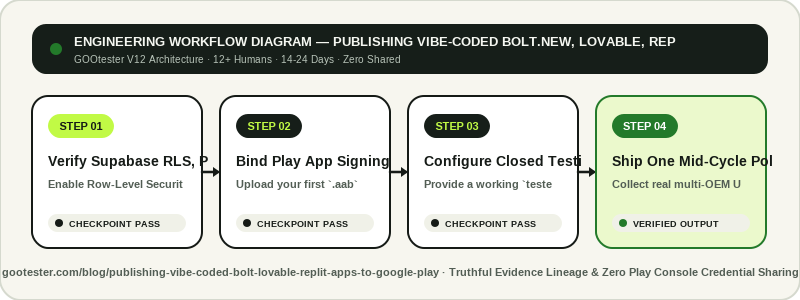
3. 4-Step Launch Sequence From `.aab` Upload to 14-Day Closed Testing
Having a valid `.aab` gets you onto Play Console, where Personal Developer Accounts must still clear App Content policy checks and run a 14-consecutive-day Closed Testing campaign with at least 12 opted-in testers.
Follow these four steps in order so your vibe-coded MVP never stalls at Day 0.
- Verify Supabase RLS, Privacy Policy & Account Deletion URLs: Enable Row-Level Security on every Supabase table and publish live HTTPS `/privacy` and `/delete-account` pages naming `com.example.focusflow` and `support@example.com`.
- Bind Play App Signing SHA-1 & SHA-256 to OAuth Providers: Upload your first `.aab`, copy Google's cloud App Signing SHA-1/SHA-256 from Setup > App signing, and register it in Google Cloud OAuth / Firebase so Sign-In works on Play builds.
- Configure Closed Testing Countries, App Access & Google Group: Provide a working `reviewer@example.com` test login in App Access, enable all 170+ countries on your Closed Testing track, and bind `testers@gootester.com`.
- Ship One Mid-Cycle Polish Release During Your 14-Day Window: Collect real multi-OEM UI feedback across Days 1–14, push an incremental `versionCode = 2` `.aab` fix, and document those improvements in your Production Access answers.
4. Testing Vibe-Coded Layouts on Real Android Screens & ADB QA
AI code generators preview layouts inside a clean desktop Chrome iframe—they never see how Samsung One UI font scaling at `130%`, punch-hole camera cutouts, or Android System WebView memory pressure affect your CSS flexboxes on a 4 GB RAM handset.
Running your 14-day Closed Testing window on GOOtester ($6 Basic for 12 human testers/14d, $12 Standard for 15 testers/16d, $20 Premium for 25 testers/24d) puts real consented humans onto your Play-signed app via `testers@gootester.com`, while Standard and Premium tiers also run strictly separate ARM64 physical-device ADB QA to catch startup crashes and ANRs. Google Play alone decides Production Access, and GOOtester's clock starts only after verified Closed Testing track setup.
- Add `@capacitor/app` `backButton` handling so Android's edge-swipe back navigates React Router history cleanly.
- Include an in-app 'Report AI Output' button if your Bolt/Lovable app generates LLM text or images.
- Strip unused camera, microphone, or location permissions injected by template plugins unless actively used.
- Test dark-mode system status bar contrast so black icons never disappear against a dark header.
Actionable Pre-Submission Verification Checklist
- Export your Bolt.new, Lovable, or Replit codebase to Git and bundle `dist/` locally via Capacitor.
- Audit `dist/assets/*.js` to ensure zero LLM, Stripe secret, or Supabase `service_role` keys are exposed.
- Remove or replace web Stripe digital-subscription links inside the Android client to pass Payments Policy.
- Add safe-area CSS insets (`env(safe-area-inset-top/bottom)`) and Android back-gesture routing.
- Register Play Console's cloud App Signing SHA-1/SHA-256 certificates in Google OAuth and `assetlinks.json`.
- Bind `testers@gootester.com` with All Countries enabled and wait for setup verification to start your 14-day clock.
Frequently Asked Questions
Can I publish a Lovable or Bolt.new web URL directly to Google Play without Android Studio?
You cannot submit a bare URL to Play Console—Google Play requires a signed `.aab`. However, you can compile the `.aab` either locally with Android Studio/Gradle or headlessly in GitHub Actions ubuntu runners without owning a high-end workstation.
Will Google reject my vibe-coded app just because AI helped write the TypeScript code?
No. Google Play evaluates runtime quality, policy compliance, security, and genuine mobile utility—not whether a human or an LLM typed the React components. Apps only get rejected when builders leave broken links, remote WebView errors, or policy violations unaddressed.
Is Supabase anon key safe to leave inside my Capacitor Android bundle?
Supabase's public `anon` key is designed for client bundles ONLY if Row-Level Security (RLS) policies are strictly enabled on every Postgres table and Storage bucket. Never include the `service_role` secret key in mobile apps.
How many updates should I push to my vibe-coded app during the 14-day closed test?
Shipping at least 1 to 2 incremental `.aab` updates (`versionCode` 2 and 3) fixing real layout, back-navigation, or onboarding friction discovered during Closed Testing creates strong engineering evidence for your Production Access review.