1. Why Hard Paywalls Sabotage External 12-Tester Engagement
Consumer subscription growth blogs often preach putting an unskippable onboarding paywall (`$9.99/week with 3-day trial`) before the home screen. In public Production, you can A/B test paywalls freely—but shipping a **hard, non-dismissible credit-card paywall** into a 14-day Closed Testing campaign is a recipe for disaster.
Here is why: Play Console's **Setup > License testing** table requires typing explicit individual emails (`dev@example.com`) to enable Google's sandbox test card. External privacy-preserving Google Group testers (`testers@gootester.com`) are *not* on your internal License Testing list—so tapping Subscribe prompts them to charge their **real personal Visa or UPI account**! Naturally, rational testers close the app immediately, leaving you with 4-second session durations and a Day-15 **'More testing required'** rejection.
| Cohort | How They Install | Billing / Entitlement Mechanism | Real Money Charged? |
|---|---|---|---|
| Developer & QA (`dev@example.com`) | Internal or Closed Track | Play Console `Setup > License testing` (`Test card, always approves`) | No — 5-min accelerated sandbox |
| 12–25 External Testers (`testers@gootester.com`) | Closed Testing Google Group | Dismissible soft paywall + free tier OR RevenueCat promotional grant | No — full feature QA without card |
| Google Play Reviewer (`reviewer@example.com`) | Play Review Harness | Pre-granted `pro` entitlement on demo login in `App access` | No — instant premium screen audit |
2. Initializing RevenueCat & Preventing Empty `Offerings` in Closed Builds
Nothing confuses indie Flutter, Expo, and Kotlin developers more than seeing `offerings.current == null` on their Closed Testing phone when the exact same code worked in RevenueCat's local preview mode. For Google Play Billing Library v7/v8 to return live SKU details, four conditions must hold simultaneously: (1) your `.aab` declares `com.android.vending.billing.BILLING`, (2) the Subscription **and** at least one Base Plan are set to **Active** in Play Console, (3) your Play Developer API Service Account has **Financial data + Manage orders** permissions (often requiring 24 hours to propagate—re-toggle a product description in Play Console to force sync!), and (4) the device installed the build from Google Play (or `bundletool` signed properly) with an active Play Store account.
Initialize RevenueCat with your **public** Google Play SDK key (`goog_...`—never your secret `sk_...` REST v2 key!) and render a graceful close (`X`) button on your paywall during Closed Testing.
import Purchases, { LOG_LEVEL } from "react-native-purchases";

export async function configureBilling(appUserId: string): Promise<void> {
  if (__DEV__) {
    await Purchases.setLogLevel(LOG_LEVEL.DEBUG);
  }
  // Use ONLY RevenueCat's public Google Play key (NEVER embed secret REST API keys!)
  Purchases.configure({
    apiKey: "<YOUR_PUBLIC_REVENUECAT_GOOGLE_PLAY_KEY>",
    appUserID: appUserId
  });

  const offerings = await Purchases.getOfferings();
  if (!offerings.current || offerings.current.availablePackages.length === 0) {
    // Graceful fallback: never block app navigation if Play Store SKUs are still syncing
    console.warn("Play Billing offerings unavailable; continuing in free/soft-gate mode.");
  }
}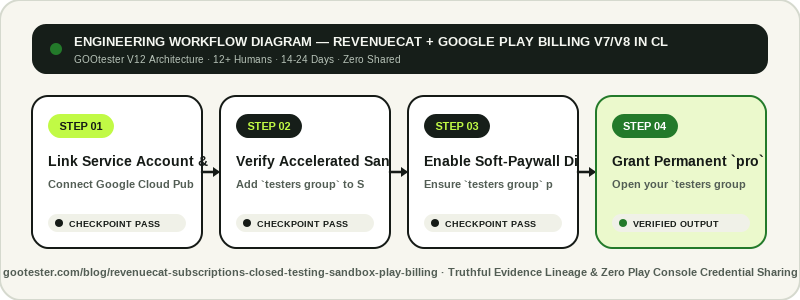
3. 4-Step Sandbox & RTDN Verification Sequence Before Day 1
Test the full subscription lifecycle—purchase, 5-minute sandbox renewal, cancellation, and Restore Purchases—on your own **Tester #0** handset before opening Closed Testing to external participants.
- Link Service Account & Cloud Pub/Sub RTDN in RevenueCat: Connect Google Cloud Pub/Sub Real-Time Developer Notifications in Play Console > Monetization setup so renewals and cancellations update RevenueCat entitlements in seconds.
- Verify Accelerated Sandbox Renewals on `dev@example.com`: Add `dev@example.com` to Setup > License testing, install from Closed/Internal track, buy with `Test card, always approves`, and verify 5-minute monthly renewals.
- Enable Soft-Paywall Dismiss (`X`) or Beta Entitlements for Testers: Ensure `testers@gootester.com` participants can dismiss any paywall (or unlock beta features via a RevenueCat Remote Config flag / Promo Code) to test core screens deeply.
- Grant Permanent `pro` Entitlement to `reviewer@example.com`: Open your `reviewer@example.com` customer record inside the RevenueCat dashboard, click **Grant Promotional**, and paste those login credentials into Play Console App Access.
4. Subscriptions Policy UI Rules Google Reviewers Audit on Paywalls
Even when your technical integration is flawless, Google Play's **Subscriptions policy** rejects paywalls with deceptive visual hierarchy—such as hiding the recurring billing price (`$49.99/year after 7-day free trial`) in tiny low-contrast grey text while screaming **`FREE`** in 32pt bold type, or omitting a working **Restore Purchases** button.
Display billing frequency, exact post-trial price, and cancellation instructions (`Cancel anytime in Google Play Subscriptions`) prominently on the paywall, validate across 12–25 real human testers via GOOtester ($6 Basic / $12 Standard / $20 Premium), and use separate ARM64 physical-device ADB QA ($12 Standard / $20 Premium) to verify zero `BillingClient` deadlocks. Google Play alone decides Production Access, and GOOtester's clock starts only after verified `testers@gootester.com` track setup.
- Verify your Google Payments Merchant account is linked and active before creating Subscriptions in Play Console.
- Always render localized price strings returned by `pkg.product.priceString` rather than hardcoding `"$9.99"` in JSX/Compose.
- Include clickable Privacy Policy, Terms of Use, and Restore Purchases buttons directly on your paywall footer.
- If switching back to a stricter paywall after Production approval, roll out via RevenueCat Offerings without breaking existing testers.
Actionable Pre-Submission Verification Checklist
- Activate at least one Subscription + Base Plan in Play Console and verify Google Cloud Pub/Sub RTDN delivery.
- Add your own `dev@example.com` login to `Setup > License testing` to test `Test card, always approves`.
- Keep your paywall dismissible (or provide generous free/promotional access) so `testers@gootester.com` never hit a credit-card wall.
- Grant a promotional `pro` entitlement to `reviewer@example.com` in RevenueCat and document it in App Access.
- Render localized `priceString` values, clear post-trial renewal terms, and a working Restore Purchases button.
- Confirm zero RevenueCat secret v2 REST keys (`sk_...`) exist anywhere inside your mobile repository.
Frequently Asked Questions
Will external closed testers get charged real money if they tap my Play Billing button?
Yes—any user NOT explicitly listed in your Play Console `Setup > License testing` emails sees real Google Play checkout! Always provide a clear dismissible paywall or promotional access so external testers never need to buy a subscription to test your app.
Why does RevenueCat throw `CREDENTIALS_ISSUE` right after I connect my Google Service Account JSON?
Google Play's Developer API famously takes up to 24–36 hours to propagate newly granted Service Account permissions—unless you edit and save a minor description change on an In-App Product or Subscription inside Play Console, which triggers an immediate permission cache refresh!
Can I use Google Play Promo Codes for subscriptions during Closed Testing?
Google Play supports custom/one-time Promo Codes for one-time IAPs and free-trial subscription offers (note that subscription promo codes still ask users for a valid payment method on file in Play Store), which is why a soft paywall or RevenueCat promotional entitlement is much smoother for external testers.
Does Expo Go support testing Google Play Billing and RevenueCat?
Standard Expo Go lacks your custom `applicationId` and Play App Signing certificate required by Play Billing. Always build a development build or signed `.aab` via EAS Build and install through a Play Console track.