
1. Does Transferring an App Reset the 14-Day Closed Testing Clock?
Many indie builders launch their MVP under a Personal Developer Account (`$25` registration) to validate traction before spending time and legal fees incorporating an LLC or Ltd and waiting for a Dun & Bradstreet D-U-N-S number. Once the company exists, the natural question is whether migrating the package via **Setup > App transfer** resets Closed Testing progress or pulls a live app offline.
The answer depends strictly on the **destination account's classification** and **current Production status**. D-U-N-S verified Organization Developer Accounts are exempt from the 12-tester / 14-day Personal Account gate. If your app is already live in Production on your Personal account, transferring it to your verified Organization account keeps it live seamlessly with zero downtime. Even if your app has not yet completed Production Access on your Personal account, moving an eligible app into a *fully verified* Organization account adopts the Organization account's Production eligibility once all App Content declarations pass review.
| Transfer Direction | Current App State | 12-Tester Gate After Transfer? | Store Listing & Install Impact |
|---|---|---|---|
| Personal -> Verified Organization | Live in Production | No — stays live in Production | Zero downtime; keeps installs & stars |
| Personal -> Verified Organization | In Closed Testing | No — Org exemption applies post-verify | Retains packageId & App Signing key |
| Organization -> Post-2023 Personal | Unreleased / Pre-Prod | Yes — 12 testers / 14 days required | Personal account gate enforced |
| Post-2023 Personal -> Post-2023 Personal | Mid-Closed Testing | Risky — avoid mid-cycle transfers | Finish Production approval before moving |
2. Prerequisites: Why Play Console Rejects Incomplete Transfer Requests
Note that Google Play prohibits converting a Personal Developer Account *in place* into an Organization account—you must register a separate Organization Google Play Console account tied to your legal entity's D-U-N-S profile and execute an inter-account **App transfer**. Both accounts must have passed all identity, phone, email (`developer@example.com`), and payment profile verification gates first.
To initiate the request from the source account, you will need the target Organization account's **Developer Account ID** (a 19-digit numeric identifier found under **Account details**) and the original `$25` registration **Order Transaction ID** (`01234567890123456789.token...` from Google Payments Center `payments.google.com`). Paid apps or apps with active Play Billing subscriptions additionally require an active, verified Google Payments Merchant profile on the target Organization account before submission.
{
  "packageName": "com.example.indiesuite",
  "sourceAccountType": "PERSONAL_VERIFIED",
  "targetAccountType": "ORGANIZATION_DUNS_VERIFIED",
  "targetAccountIdFormat": "19_DIGIT_PLAY_ACCOUNT_ID",
  "targetMerchantProfileActive": true,
  "preservedArtifacts": ["applicationId", "playAppSigningKey", "ratings", "installHistory"],
  "manualRebindRequired": ["googleCloudOAuthProject", "playDeveloperApiServiceAccount", "admobAppAdsTxt"]
}
3. 4 Integrations That Silently Break Right After Transfer Approval
While binary delivery, Play App Signing certificates, and existing user updates continue automatically after the target Organization accepts the transfer, cloud backend integrations tied to the old Play Console project do *not* always migrate themselves.
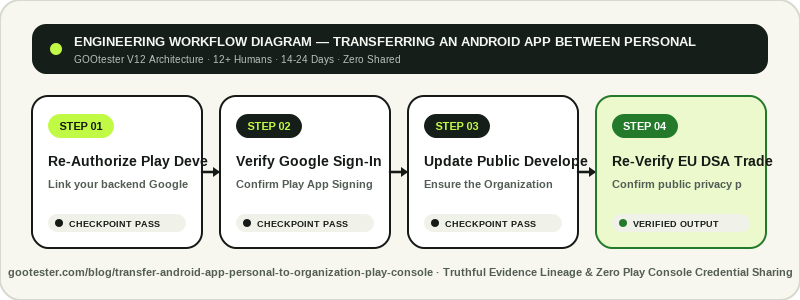
Execute this four-step engineering cutover checklist immediately upon transfer completion so logins and subscription renewals never drop.
- Re-Authorize Play Developer API & RTDN Webhooks: Link your backend Google Cloud Service Account under Users and permissions in the new Organization Play Console so subscription purchaseToken verification continues.
- Verify Google Sign-In & Firebase SHA-1 / SHA-256 Parity: Confirm Play App Signing's SHA-1 and SHA-256 certificates match your Firebase / Google Cloud OAuth Android Client IDs and `/.well-known/assetlinks.json`.
- Update Public Developer Website & app-ads.txt: Ensure the Organization account's Developer Website URL serves your current `app-ads.txt` publisher lines so AdMob fill rates do not pause.
- Re-Verify EU DSA Trader & Data Safety Contact Endpoints: Confirm public privacy policy and account deletion URLs reflect the new legal entity name and corporate support email (`developer@example.com`).
4. Strategic Timing: Launch on Personal Now vs. Wait for D-U-N-S?
International D-U-N-S issuance and corporate bank account setup can easily take three to six weeks. If your Android app is ready today and does not belong to an Organization-only restricted vertical (such as banking, clinical medical devices, or standalone consumer VPNs), running a structured 14-day closed test on your Personal account lets you gather real multi-device feedback immediately and transfer later.
Remember that Google Play alone decides Production Access, and GOOtester's service clock starts only after `testers@gootester.com` track setup is verified. If you run Closed Testing on a Personal account first, avoid initiating any App Transfer mid-way through your 14-day window—let Production Access finish cleanly first, or complete D-U-N-S verification before uploading.
- Locate registration Transaction IDs at `payments.google.com` under Activity before starting.
- Keep your old Personal account compliant (or cleanly closed via Support once empty) so it never triggers dormancy warnings.
- Export historical financial and tax CSV reports from the source account prior to transfer.
- Test one Internal Testing update on the new Organization account before pushing a 100% Production release.
Actionable Pre-Submission Verification Checklist
- Complete full identity, D-U-N-S, and Payments Merchant verification on the destination Organization account.
- Retrieve the destination 19-digit Account ID and registration Order Transaction ID from Google Payments.
- Avoid transferring an app mid-way through an active 14-day Personal Closed Testing streak.
- Grant your backend Service Account permissions in the new Organization Play Console immediately at cutover.
- Update your Privacy Policy and Account Deletion pages to name the new Organization legal entity.
- Verify Play Billing RTDN webhooks, OAuth logins, and `app-ads.txt` immediately after transfer completion.
Frequently Asked Questions
Can I upgrade my Personal Google Play account directly into an Organization account?
No. Google Play does not support in-place account type conversion. You must register a new Organization Developer Account using a verified D-U-N-S number and transfer your apps via Setup > App transfer.
Will existing users have to uninstall and reinstall my app after an account transfer?
No. Because both your `applicationId` and Google Play App Signing key transfer intact to the Organization account, existing users receive future updates seamlessly without losing local app data.
What happens to active monthly subscribers when I transfer my app?
Active subscriptions and SKUs migrate with the app once the destination Organization's Payments Merchant profile is active; payouts after the transfer timestamp route to the new Organization merchant account.
Can I transfer an app that has never been published to Production yet?
Google Play supports transferring apps once initial upload and policy eligibility checks are satisfied and both accounts are verified, though completing any active review before initiating transfer avoids state locks.