1. 1. Why CI/CD Automation Is a Force Multiplier for 14-Day Closed Testing
Passing Google Play's 12-tester, 14-day closed testing requirement is not a passive waiting game. Google Play reviewers inspect your release track history to verify that you shipped iterative Android App Bundle (.aab) updates addressing tester bug reports, UI defects, and Android Vitals warnings before applying for Production Access.
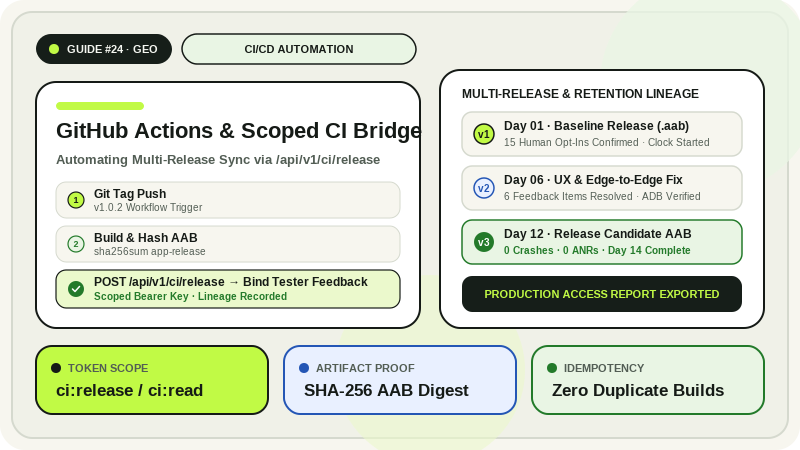
When developers compile and sign AABs manually on a laptop, release friction quickly slows iteration: forgotten versionCode increments, uncommitted untracked changes, lost symbol files, and out-of-sync notifications to testers. By wiring your repository to GitHub Actions and GOOtester's Scoped CI/CD Release Bridge, every tagged commit automatically compiles, signs, publishes, and notifies your testing cohort.
Even better, automated CI builds generate an immutable provenance trail linking your Git commit SHA, integer versionCode, and the exact SHA-256 cryptographic digest of your .aab artifact—evidence that attaches directly to your GOOtester Production Readiness Report.
| Release Stage | Manual Laptop Workflow | Automated GitHub Actions + GOOtester CI Bridge |
|---|---|---|
| versionCode Increment | Manual edit in build.gradle; prone to duplicate errors | Derived deterministically from github.run_number + offset |
| Keystore & Signing | Local JKS file on one developer machine | Base64-decoded in ephemeral runner memory & wiped post-job |
| Tester Re-Verification | Manually message testers after Play Console rollout | POST /api/v1/ci/release auto-notifies cohort & queues ADB check |
| Evidence Provenance | Ad-hoc screenshots at Day 14 | Cryptographic SHA-256 AAB digest & commit SHA logged per release |
2. 2. Provisioning Scoped ci:release API Keys with Least-Privilege Security
Security best practices dictate that continuous integration runners should never hold master session cookies or billing-capable account credentials. GOOtester's API architecture enforces strict scope separation so you can issue dedicated CI tokens restricted solely to release registration and campaign status queries.
In your GOOtester developer dashboard, navigate to Settings -> CI/CD Release Bridge and generate a scoped key carrying only the ci:release and ci:status permissions. The platform displays the plaintext token once (formatted like gt_live_example_token_12345) and stores only its irreversible SHA-256 digest in the database.
Store this token inside your GitHub repository under Settings -> Secrets and variables -> Actions as GOOTESTER_CI_TOKEN, alongside your base64-encoded upload keystore (ANDROID_KEYSTORE_BASE64) and signing passwords. You can revoke or rotate a scoped CI key at any time with a single click without disrupting your active 14-day test.
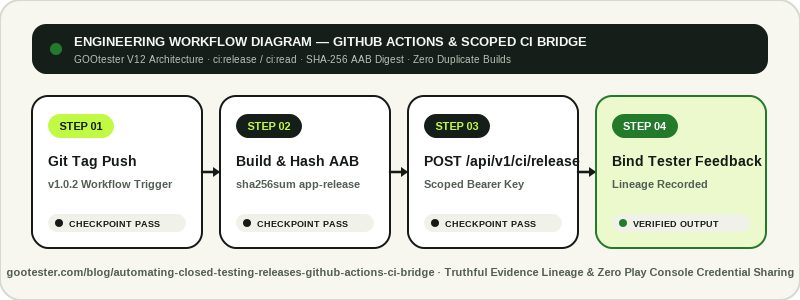
3. 3. Production-Ready GitHub Actions Workflow (.github/workflows/android-closed-test.yml)
The complete GitHub Actions workflow below runs on every push to the release/closed-test branch or on manual workflow_dispatch triggers. It sets up JDK 17, decodes your upload keystore into an ephemeral runner path, compiles the signed release Android App Bundle with an auto-incremented versionCode, and computes the artifact's SHA-256 hash.
After uploading the signed AAB to your Google Play Console Closed Testing track, the final step invokes GOOtester's POST /api/v1/ci/release endpoint. It passes the campaign ID, package name, versionCode, versionName, Git commit SHA, and SHA-256 bundle digest.
Notice that the workflow cleans up the temporary decoded keystore file in an if: always() step so signing material never lingers on self-hosted or ephemeral runners.
name: Android Closed Testing Release & GOOtester Sync

on:
  push:
    branches: [ "release/closed-test" ]
  workflow_dispatch:
    inputs:
      release_notes:
        description: "Summary of fixes for 12-tester cohort"
        required: true
        default: "Resolved UI inset alignment and hardened offline caching"

jobs:
  build-and-sync-closed-test:
    runs-on: ubuntu-latest
    timeout-minutes: 25
    steps:
      - name: Checkout repository
        uses: actions/checkout@v4

      - name: Set up JDK 17
        uses: actions/setup-java@v4
        with:
          distribution: "temurin"
          java-version: "17"

      - name: Decode Android Upload Keystore
        env:
          KEYSTORE_B64: ${{ secrets.ANDROID_KEYSTORE_BASE64 }}
        run: |
          echo "$KEYSTORE_B64" | base64 --decode > "$RUNNER_TEMP/upload-keystore.jks"

      - name: Build Signed Release AAB
        env:
          VERSION_CODE: ${{ github.run_number }}
          KEYSTORE_PATH: "${{ runner.temp }}/upload-keystore.jks"
          KEYSTORE_PASS: ${{ secrets.ANDROID_KEYSTORE_PASSWORD }}
          KEY_ALIAS: ${{ secrets.ANDROID_KEY_ALIAS }}
          KEY_PASS: ${{ secrets.ANDROID_KEY_PASSWORD }}
        run: |
          cd android
          ./gradlew bundleRelease \
            -PversionCode=$((100 + VERSION_CODE)) \
            -Pandroid.injected.signing.store.file="$KEYSTORE_PATH" \
            -Pandroid.injected.signing.store.password="$KEYSTORE_PASS" \
            -Pandroid.injected.signing.key.alias="$KEY_ALIAS" \
            -Pandroid.injected.signing.key.password="$KEY_PASS"

      - name: Notify GOOtester CI/CD Release Bridge
        env:
          GOOTESTER_TOKEN: ${{ secrets.GOOTESTER_CI_TOKEN }}
          CAMPAIGN_ID: ${{ vars.GOOTESTER_CAMPAIGN_ID }}
          PACKAGE_NAME: "com.indielabs.pulsehabit"
        run: |
          AAB_FILE="android/app/build/outputs/bundle/release/app-release.aab"
          AAB_SHA256=$(sha256sum "$AAB_FILE" | awk '{print $1}')
          V_CODE=$((100 + ${{ github.run_number }}))

          curl -sS --fail-with-body -X POST "https://gootester.com/api/v1/ci/release" \
            -H "Authorization: Bearer $GOOTESTER_TOKEN" \
            -H "Content-Type: application/json" \
            -d "{
              \"campaign_id\": \"$CAMPAIGN_ID\",
              \"package_name\": \"$PACKAGE_NAME\",
              \"version_code\": $V_CODE,
              \"version_name\": \"1.0.${{ github.run_number }}\",
              \"aab_sha256\": \"$AAB_SHA256\",
              \"git_commit\": \"${{ github.sha }}\",
              \"track\": \"closed-testing\",
              \"trigger_hardware_qa\": true,
              \"release_notes\": \"Automated CI closed testing release #$V_CODE\"
            }"

      - name: Wipe Ephemeral Keystore
        if: always()
        run: rm -f "$RUNNER_TEMP/upload-keystore.jks"
4. 4. Anatomy of POST /api/v1/ci/release & Artifact SHA-256 Verification
When your GitHub Actions runner calls POST https://gootester.com/api/v1/ci/release, GOOtester validates five strict invariants before recording the release: the Bearer token must carry the ci:release scope, the campaign_id must belong to the authenticated developer account, the package_name must match the locked campaign package identifier, the integer version_code must exceed the previous release, and aab_sha256 must be a valid 64-character hex digest.
Upon acceptance, the API appends a cryptographically timestamped entry to your campaign's release ledger and returns an HTTP 201 JSON payload containing your release_id, updated version history count, and queued verification tasks.
If trigger_hardware_qa is set to true, the bridge also notifies our physical Android hardware queue to pull the updated build once live on Google Play and execute an automated cold-boot, RAM PSS, and UI frame-jank verification pass.
- Enforces monotonically increasing version_code integers to mirror Google Play Console's upload rules.
- Records the 64-character SHA-256 digest of your app-release.aab and git_commit SHA for your Day-14 Evidence Pack.
- Dispatches immediate update prompts to your 12+ opted-in human testers so installs roll forward smoothly.
- Supports idempotent retries when the same (campaign_id, version_code, aab_sha256) tuple is re-sent by a retried CI job.
5. 5. Querying Campaign Opt-In & 14-Day Clock Status via GET /api/v1/ci/status
In addition to pushing new builds, engineering teams can monitor their 14-day closed testing progression programmatically using GET https://gootester.com/api/v1/ci/status?campaign_id=<id>. Authenticate using the same scoped key (for example, Authorization: Bearer gt_live_example_token_12345) granted the ci:status scope.
The JSON response reports your real-time opted_in_testers_count (verifying >= 12 active testers), continuous_days_elapsed (0 through 14), releases_shipped_count, latest_version_code, hardware_qa_status, and production_readiness_unlocked boolean.
You can run a lightweight daily GitHub Actions cron schedule that queries GET /api/v1/ci/status and posts a summary directly to your team's Slack, Discord, or GitHub Job Summary page, alerting you when your campaign hits Day 6 (time to ship a midpoint maintenance release) and Day 14 (ready to apply for Production Access).
#!/usr/bin/env bash
set -euo pipefail

# Example status query using a scoped ci:status token
GOOTESTER_TOKEN="${GOOTESTER_CI_TOKEN:-gt_live_example_token_12345}"
CAMPAIGN_ID="${GOOTESTER_CAMPAIGN_ID:-cmp_v12_9f8a7b6c}"

curl -sS --fail-with-body \
  -H "Authorization: Bearer ${GOOTESTER_TOKEN}" \
  -H "Accept: application/json" \
  "https://gootester.com/api/v1/ci/status?campaign_id=${CAMPAIGN_ID}" | jq .
6. 6. Coordinating Managed Publishing and Play Store Propagation Windows
One important operational detail when automating Google Play Closed Testing releases is Google's propagation delay between uploading an AAB via the Google Play Developer API and the update becoming downloadable on tester devices. Furthermore, if Managed Publishing is turned on in Google Play Console, API uploads sit in the 'Ready to send for review' queue until manually approved.
For seamless CI/CD automation during your 14-day closed test, either disable Managed Publishing while iterating on your Closed Testing track or check Publishing Overview immediately after your GitHub Actions workflow completes so Google processes the update without delay.
GOOtester's release bridge accounts for Play Store CDN propagation automatically—staggering tester update notifications and physical device verification checks so your 12+ testers always pull the newly published versionCode cleanly.
- Generate Scoped CI Key in GOOtester: Create a token restricted to ci:release and ci:status scopes and save it as GOOTESTER_CI_TOKEN in GitHub Actions Secrets.
- Trigger Closed Testing Release Workflow: Push to release/closed-test to compile your signed .aab, upload to Google Play, and register the SHA-256 digest via POST /api/v1/ci/release.
- Export Day-14 Production Evidence Pack: Once GET /api/v1/ci/status reports continuous_days_elapsed: 14 and production_readiness_unlocked: true, export your audit report for Google Play.
Actionable Pre-Submission Verification Checklist
- Generate a least-privilege GOOtester API token restricted to ci:release and ci:status scopes (never commit plaintext tokens).
- Store ANDROID_KEYSTORE_BASE64, signing passwords, and GOOTESTER_CI_TOKEN inside encrypted GitHub Actions repository secrets.
- Derive versionCode deterministically in CI (for example, base offset + github.run_number) so every build increments strictly.
- Compute the 64-character SHA-256 digest of app-release.aab on the runner and send it to POST https://gootester.com/api/v1/ci/release.
- Wipe the decoded upload-keystore.jks file in an if: always() cleanup step at the end of every GitHub Actions job.
- Query GET https://gootester.com/api/v1/ci/status to verify >= 12 opted-in testers, >= 2 shipped releases, and 14 continuous days.
Frequently Asked Questions
Does GOOtester's CI/CD Release Bridge require my Google Play Service Account JSON key?
No. You never need to upload your Google Cloud Service Account key or upload keystore (.jks) to GOOtester. Your own GitHub Actions runner builds, signs, and publishes the AAB directly to Google Play, and then calls GOOtester's POST /api/v1/ci/release endpoint with only metadata and the artifact's SHA-256 digest.
What permissions does a scoped GOOtester CI token have?
A scoped CI token (formatted like gt_live_example_token_12345) equipped with ci:release and ci:status permissions can only register new closed testing versionCode releases and read campaign opt-in status. It cannot access billing settings, modify account ownership, or export unrelated workspace data.
Why should I include the SHA-256 digest of my .aab file in POST /api/v1/ci/release?
Recording the exact SHA-256 cryptographic hash of every compiled Android App Bundle alongside your Git commit SHA and versionCode establishes verifiable build provenance in your Day-14 Production Readiness Report, proving to stakeholders and reviewers that distinct binary updates were shipped.
Can I use GOOtester's CI Release Bridge with GitLab CI, Bitrise, Codemagic, or EAS Workflows?
Yes. Because POST https://gootester.com/api/v1/ci/release and GET https://gootester.com/api/v1/ci/status are standard JSON REST endpoints authenticated via an Authorization: Bearer header, you can invoke them with a single curl command from any CI/CD provider.