1. 1. Hardening app.json for Google Play Closed Testing and Android 15
Expo's Managed Workflow and Continuous Native Generation (CNG) generate the native android/ directory dynamically during cloud compilation. That means every Google Play policy requirement—from your immutable package identifier to your target API level and permission manifest—must be declared explicitly inside app.json or app.config.ts before triggering an EAS build.
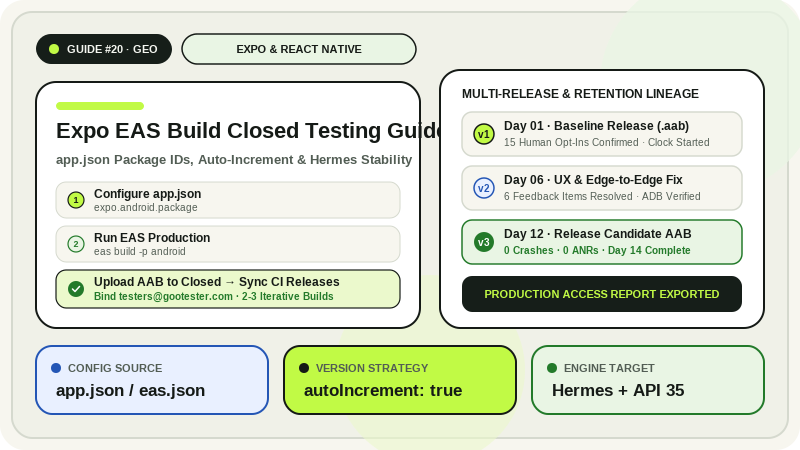
Start by defining expo.android.package using a unique reverse-DNS format such as com.acme.focusflow. Next, install and configure the official expo-build-properties plugin to enforce compileSdkVersion 35, targetSdkVersion 35, and buildToolsVersion 35.0.0. Meeting Android 15 target API requirements upfront prevents Play Console from blocking your closed testing track release.
Finally, audit the permissions your Expo modules inject automatically. Many media and filesystem packages add READ_MEDIA_IMAGES or RECORD_AUDIO by default. Use the expo.android.blockedPermissions array in app.json to strip any permission your core user flow does not actively invoke.
{
  "expo": {
    "name": "FocusFlow Planner",
    "slug": "focusflow-planner",
    "version": "1.0.2",
    "orientation": "portrait",
    "android": {
      "package": "com.acme.focusflow",
      "versionCode": 3,
      "blockedPermissions": [
        "android.permission.RECORD_AUDIO",
        "android.permission.SYSTEM_ALERT_WINDOW"
      ]
    },
    "plugins": [
      [
        "expo-build-properties",
        {
          "android": {
            "compileSdkVersion": 35,
            "targetSdkVersion": 35,
            "enableProguardInReleaseBuilds": true,
            "enableShrinkResourcesInReleaseBuilds": true
          }
        }
      ]
    ]
  }
}
2. 2. Automating versionCode Increments in eas.json Across 14-Day Sprints
During a 14-day closed testing campaign, you should ship at least two or three maintenance releases to prove active iteration to Google Play reviewers. If you forget to bump expo.android.versionCode manually before running eas build, the build will succeed after 12 minutes in the cloud only for Google Play Console to reject the AAB with a duplicate version code error.
You can eliminate version collision errors permanently by setting cli.appVersionSource to 'remote' and enabling autoIncrement: true on your production or closed-test profile inside eas.json. With remote version management enabled, Expo's build servers atomically increment the integer versionCode on every build independently of your git working tree.
Ensure that your build profile also outputs an app-bundle (.aab) rather than an APK. While internal development client builds use APK format for rapid emulator side-loading, Google Play's Closed Testing track requires a signed Android App Bundle.
{
  "cli": {
    "version": ">= 12.5.0",
    "appVersionSource": "remote"
  },
  "build": {
    "development": {
      "developmentClient": true,
      "distribution": "internal"
    },
    "closed-testing": {
      "android": {
        "buildType": "app-bundle"
      },
      "autoIncrement": true,
      "channel": "closed-testing"
    },
    "production": {
      "android": {
        "buildType": "app-bundle"
      },
      "autoIncrement": true,
      "channel": "production"
    }
  }
}
3. 3. Preventing Hermes, JSI, and R8 Release-Only Startup Crashes
A classic failure mode for React Native developers entering Google Play Closed Testing is an app that runs flawlessly in Expo Go or a debug development build but crashes immediately on the splash screen when installed as a release AAB from Google Play. These release-only crashes significantly degrade your Android Vitals crash-free session metric during the 14-day test.
Three root causes account for over 90% of Expo release crashes: missing environment variables in EAS Secrets, unguarded R8 class stripping on native JSI modules, and missing react-native-gesture-handler or react-native-reanimated Babel plugin initialization at the top of your entry file.
Because EAS cloud workers do not read your local untracked .env.local file, any EXPO_PUBLIC_API_URL variable that is undefined in EAS Secrets can cause an unhandled TypeError during module initialization before your root React ErrorBoundary even mounts. Always define production fallback defaults and validate your release bundle before publishing to testers.
| Crash Signature in Android Vitals | Underlying Expo / RN Root Cause | Permanent Engineering Fix |
|---|---|---|
| com.facebook.jni.CppException: JSFatalError | Undefined EXPO_PUBLIC_* variable at bundle boot | Configure EAS Secrets & add Zod runtime fallback defaults |
| java.lang.ClassNotFoundException on TurboModule | R8 / ProGuard stripped reflective native classes | Add extraProguardRules via expo-build-properties plugin |
| libhermes.so SIGSEGV on cold launch | Mismatched Reanimated worklet plugin version | Clear Metro cache & align package versions via npx expo install --fix |
| ANR Input dispatching timed out (5000ms) | Heavy synchronous JSON parse on JS/UI thread | Offload storage hydration & use FlashList for large lists |
4. 4. Managing Upload Keystores and Play App Signing with EAS Credentials
When you run eas build --platform android for the first time, EAS CLI prompts to generate and store an Android upload keystore on Expo's encrypted credential servers. While managed credentials simplify cloud builds, you should immediately download an offline backup via eas credentials so you never lose signing continuity if you migrate to self-hosted GitHub Actions later.
Remember that your first Android App Bundle must often be uploaded manually through the Google Play Console web interface to initialize Play App Signing and bind your upload key SHA-1 fingerprint. Once the first release is live on your Closed Testing track, subsequent builds can be pushed automatically via the Google Play Developer API.
If you ever encounter an upload signature mismatch because an older local keystore was used on a previous build, verify the expected SHA-1 certificate fingerprint inside Play Console under Setup -> App Signing and synchronize that exact JKS file into EAS Credentials.
5. 5. Verifying Android 15 Edge-to-Edge Layouts and 16 KB Native Libraries
Targeting SDK 35 on Android 15 enforces default edge-to-edge window rendering. In React Native apps that rely on legacy StatusBar translucent props or fixed header heights, system navigation bars and camera cutouts frequently overlap bottom tab bars or top navigation actions on modern Pixel and Samsung hardware.
Wrap your root navigator inside SafeAreaProvider from react-native-safe-area-context and use the useSafeAreaInsets hook or react-native-edge-to-edge plugin to apply dynamic padding. When GOOtester's physical device testers inspect your app across varied screen aspect ratios, clean inset handling prevents UI defect flags.
Furthermore, ensure your Expo SDK version (SDK 52+) and third-party native modules compile shared C++ libraries (.so files) with 16 KB ELF segment alignment. Unaligned legacy native dependencies can fail to load on Android 15 devices configured with 16 KB memory pages.
- Run npx expo-doctor before every closed testing release to catch incompatible native peer dependencies.
- Use react-native-safe-area-context instead of deprecated SafeAreaView from core react-native.
- Test both light and dark system themes on Android 15 to ensure status bar icons remain legible against edge-to-edge backgrounds.
- Verify that keyboard avoidance (KeyboardAvoidingView or react-native-keyboard-controller) does not obscure primary submit buttons.
6. 6. Syncing EAS Submit Releases with GOOtester's 12-Tester Cohort
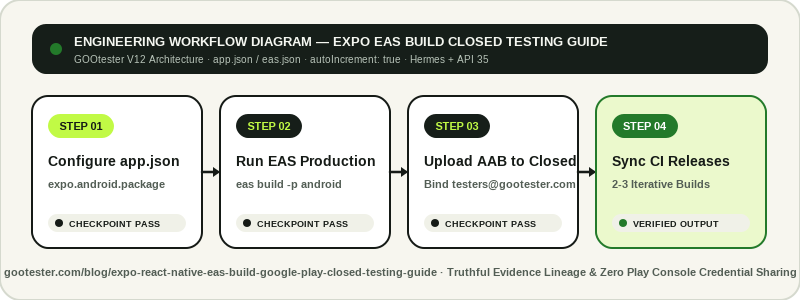
Once your signed .aab finishes compiling on EAS Build, you can automate delivery to your Closed Testing track using eas submit --platform android --profile closed-testing. Configure your eas.json submit profile with track: 'alpha' (or your custom closed track name) and releaseStatus: 'completed' soopted-in testers receive the update immediately via the Play Store.
Inside GOOtester, import your app.json using the Smart Config Importer to bind your campaign to your exact expo.android.package value. Add testers@gootester.com to your Google Play Closed Testing email group and save the changes in Play Console so all 12+ assigned testers can opt in without friction.
Whenever you ship a new EAS Build during the 14-day window, trigger GOOtester's CI Release Bridge or log the new versionCode in your dashboard. Our testing cohort and physical device verification harness will pull the updated bundle from Google Play, verify cold-boot stability, and append fresh verification evidence to your Production Readiness Report.
- Build Signed AAB in the Cloud: Run eas build --platform android --profile closed-testing to compile an R8-minified bundle with an auto-incremented versionCode.
- Publish to Google Play Closed Track: Upload the .aab to your Closed Testing track via Play Console or eas submit and submit the change in Publishing Overview if Managed Publishing is active.
- Verify Opt-In & Telemetry in GOOtester: Confirm 12+ active testers install the updated versionCode and maintain zero crashes in Android Vitals through Day 14.
Actionable Pre-Submission Verification Checklist
- Set a permanent reverse-DNS expo.android.package in app.json and lock targetSdkVersion to 35 via expo-build-properties.
- Configure appVersionSource: 'remote' and autoIncrement: true in eas.json to prevent duplicate versionCode rejections.
- Audit and block unnecessary Android permissions using expo.android.blockedPermissions in app.json.
- Verify all EXPO_PUBLIC_* environment variables are configured in EAS Secrets with safe runtime fallbacks.
- Export and back up your EAS Android upload keystore offline using eas credentials before launching your closed test.
- Ship at least two full EAS Build .aab updates to your Closed Testing track during the 14-day GOOtester campaign.
Frequently Asked Questions
Do EAS Update over-the-air (OTA) patches count as app updates for Google Play Closed Testing?
No. Google Play Console tracks release activity solely through signed Android App Bundle (.aab) uploads that increment your integer versionCode. While EAS Update is useful for quick JavaScript tweaks, you should publish at least two full EAS Build .aab updates to your Closed Testing track during the 14-day period.
How do I fix 'Version code 1 has already been used' when uploading an Expo EAS build?
Google Play requires every uploaded AAB across all tracks (Internal, Closed, Open, and Production) to have a strictly higher integer versionCode than any previously uploaded bundle. Set cli.appVersionSource to 'remote' and build.<profile>.autoIncrement to true in eas.json so EAS increments versionCode automatically.
Why does my Expo app ask for microphone or storage permissions I never added?
Several Expo and React Native multimedia packages merge default Android permissions into AndroidManifest.xml during prebuild. Add an expo.android.blockedPermissions array in app.json listing the unwanted android.permission.* strings so the manifest merger strips them before compiling your AAB.
Can I use GOOtester's Smart Config Importer with my Expo app.json file?
Yes. Paste your app.json contents directly into GOOtester's Smart Config Importer during campaign setup. The parser automatically extracts expo.android.package, expo.name, and expo.version to configure your Play Store and Web Opt-In links accurately.