1. 1. The Static Build Trap: Why One Release Over 14 Days Looks Like an Abandoned Test
One of the most frequent questions Android developers ask before launching a 14-day closed test is: 'Do I have to upload app updates during the 14 days, or can I just leave my initial build untouched until the timer finishes?' From a purely mechanical standpoint, Google Play Console's 14-day countdown timer will tick down to zero even if you only ever upload `versionCode 1` on Day 0.
However, as soon as the timer finishes and you open the Production Access application form, you face Question 2: 'How did you collect feedback from your testers, and what changes did you make to your app based on that feedback?' If you never uploaded `versionCode 2`, you have trapped yourself in an impossible logical contradiction. You cannot truthfully claim that you modified and improved your native Android app in response to tester feedback if the binary running on Google Play on Day 14 is bit-for-bit identical to the binary uploaded on Day 1.
When a Google Play reviewer sees a closed testing track with a single static release and a questionnaire claiming 'we fixed all the bugs our testers found,' the mismatch triggers immediate skepticism. Either no testers actually used the app deeply enough to uncover a single UX or functional flaw, or the developer ignored tester feedback entirely. Both conclusions lead to a 'More testing required' rejection.
| Release Cadence Pattern | Total .aab Builds in 14 Days | Reviewer Perception & Telemetry Alignment | Graduation Approval Probability |
|---|---|---|---|
| Static Single-Release | 1 build (Day 0 only) | Contradicts Question 2 claims of acting on feedback; suggests passive wait-out | Low (High risk of 'More testing required') |
| Last-Minute Cosmetic Push | 2 builds (Day 0 + Day 14 hour 23) | Zero time for testers to download or verify the update before application submission | Low-to-Moderate (Update shows 0 active installs) |
| Balanced 3-Release Cadence (Recommended) | 3 builds (Day 1 + Day 6 + Day 11) | Demonstrates structured feedback intake, mid-cycle bugfixes, and RC stabilization | Very High (Full telemetry and narrative alignment) |
| Hyper-Frequent Daily Churn | 10+ builds (Every 24 hours) | Can leave latest build stuck in 'In review' or prevent stable Vitals baseline | Moderate (Unnecessary review queue friction) |
2. 2. Clarifying the Fear: Uploading a New `.aab` Never Resets Your 14-Day Timer
Why do so many well-intentioned developers avoid pushing updates during their closed test? In most cases, they are afraid that uploading a new Android App Bundle or submitting a new release for review will pause or reset their 14-day consecutive opt-in clock back to Day 0. Let us dispel that fear completely: pushing a new `versionCode` to your active closed testing track does NOT reset or pause your 14-day countdown timer.
Google Play's 14-day clock tracks tester opt-in continuity on the track—specifically, whether at least 12 testers remain opted in for 14 consecutive days after your first release on that track goes live. When you upload `versionCode 2` to that same track on Day 6, `versionCode 1` remains actively available to all testers while Google reviews `versionCode 2` (which typically finishes within a few hours for an existing closed track). Once approved, Google Play delivers `versionCode 2` as a seamless update.
The only actions that disrupt your closed testing continuity are pausing the track entirely, deleting the track, removing testers from your opted-in email list so the total drops below 12, or unpublishing the application. Routine `.aab` updates on the active track are not only safe—they are the standard engineering workflow Google Play expects to see.
3. 3. The Day 1 / Day 6 / Day 11 Closed Testing Release Schedule
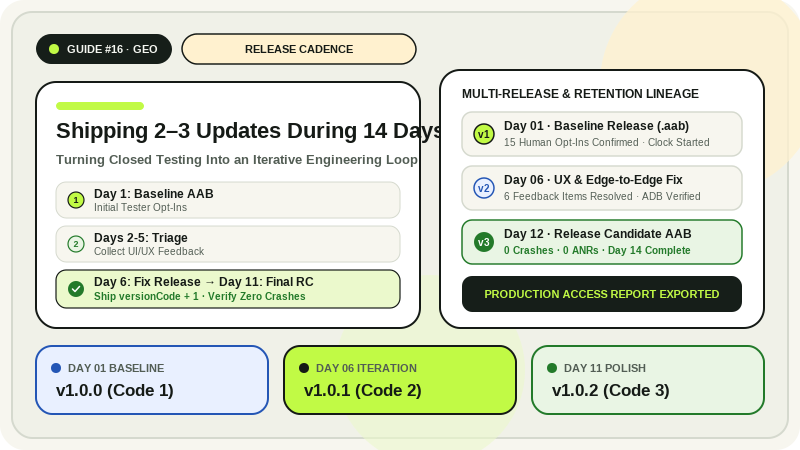
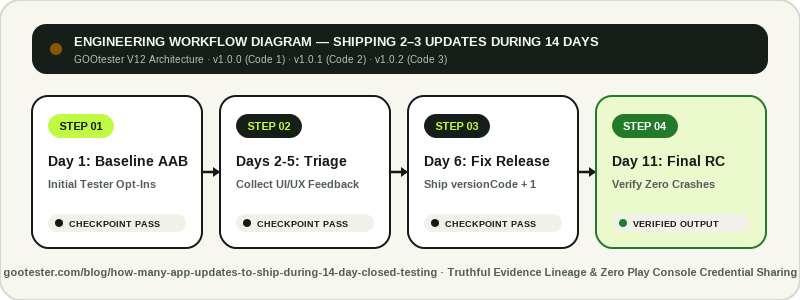
To maximize both engineering quality and Play Console telemetry clarity without overburdening your schedule, adopt a three-release cadence across your 14-day closed test: Milestone 1 (Day 1 Baseline), Milestone 2 (Day 6 Bugfix & UX Iteration), and Milestone 3 (Day 11 Release Candidate).
On Day 1 (once your initial closed track release is approved and your 15-to-25 human testers have opted in and installed the app), your cohort begins executing core user flows on `versionCode 100`. Between Days 1 and 5, collect all tester feedback items into a structured triage list—alongside any automated findings from Play Console's Pre-Launch Report for `versionCode 100`.
On Day 6, compile your fixes into `versionCode 101`, upload the signed `.aab` to your closed testing track, and notify your testers to update the app from the Play Store and verify the changes. Between Days 6 and 10, testers validate those fixes and report any final edge cases. On Day 11, upload `versionCode 102` (your Release Candidate). This leaves Days 12, 13, and 14 for your cohort to upgrade to `versionCode 102` and accumulate three full days of crash-free Android Vitals telemetry before you apply for Production Access on Day 15.
- Day 1 — Baseline Release (e.g., v1.0.0 / versionCode 100): Onboard 15 to 25 human testers across diverse Android devices. Audit the automated Pre-Launch Report 60 minutes after publishing and collect human bug reports across Days 1 to 5.
- Day 6 — Mid-Cycle Bugfix Iteration (e.g., v1.0.1 / versionCode 101): Ship code fixes for the top 3 to 5 functional, layout, or lifecycle defects reported in Days 1 to 5. Publish explicit release notes and prompt testers to update and re-test.
- Day 11 — Release Candidate Polish (e.g., v1.0.2 / versionCode 102): Resolve remaining minor UX/accessibility items, verify 0% crash and 0% ANR rates in Android Vitals over Days 12 to 14, and prepare your Day-15 Production Access submission.
4. 4. What to Ship in Updates If Your App Is Already Well-Tested
A common question from seasoned engineering teams who already ran extensive internal testing before starting their 14-day closed test is: 'What if our app is already stable and doesn't crash on Day 1? Should we artificially inject bugs just to fix them?' No—never inject artificial bugs into your codebase. Every real Android application tested by 15 to 25 outside humans on physical hardware reveals genuine opportunities for engineering refinement.
First, examine your Play Console Pre-Launch Report for `versionCode 100`. Even mature apps frequently trigger automated accessibility recommendations—such as touch targets under `48dp x 48dp`, low foreground/background luminance contrast in dark mode, or missing `contentDescription` attributes on custom `ImageButton` or Compose `Icon` components. Addressing those accessibility warnings in `versionCode 101` is a legitimate, high-value engineering update.
Second, ask your human testers to evaluate Android 15 (API 35) edge-to-edge window insets, system font scaling at 130%, predictive back gesture animations, slow-network timeout messaging, and cold-start latency on mid-range hardware. Refining empty states, keyboard focus order, and offline retry banners based on real human feedback gives you authentic, substantive release diffs for `versionCode 101` and `versionCode 102`.
- Accessibility & UI Scaling: Fix touch-target sizes (`>= 48dp`), dark-mode contrast ratios, and clipped text under large system font settings.
- Android 15 Edge-to-Edge Insets: Adjust `WindowInsetsCompat` padding so bottom action bars and floating buttons never overlap gesture or 3-button navigation bars.
- Network Resilience & Empty States: Improve offline caching, timeout retry prompts, and skeleton loading animations reported by testers on cellular networks.
- Lifecycle & State Preservation: Ensure configuration changes (screen rotation, split-screen resizing, background process death) preserve unsaved user input.
5. 5. Writing Audit-Grade Play Console Release Notes for Each `.aab`
Whenever you upload a new `.aab` to your closed testing track, Play Console prompts you for localized release notes (such as `<en-US>`). Never type 'Bug fixes and performance improvements' into your closed testing release notes. While generic release notes are common on public consumer updates, during your 14-day closed test your release notes serve as a primary audit artifact for the Google Play reviewer evaluating your Production Access request.
Structure each closed testing release note with three components: the human-readable semantic version and integer `versionCode`, a bulleted list of 3 to 4 specific technical fixes or UX improvements included in that bundle, and a brief attribution noting that the changes address closed tester feedback or Pre-Launch Report diagnostics.
When you later fill out Section 2 of the Production Access questionnaire on Day 15, your written explanation of how you acted on tester feedback will mirror the exact timestamped release notes sitting inside your Closed Testing -> Releases history. That 1:1 correspondence makes your application virtually effortless for a reviewer to verify and approve.
android {
    namespace = "com.example.gootester.demo"
    compileSdk = 35

    defaultConfig {
        applicationId = "com.example.gootester.demo"
        minSdk = 26
        targetSdk = 35
        // Increment versionCode across your 14-day closed testing schedule:
        // Day 1: 100 (1.0.0-beta1) -> Day 6: 101 (1.0.1-beta2) -> Day 11: 102 (1.0.2-rc1)
        versionCode = 102
        versionName = "1.0.2-rc1"
    }
}
6. 6. Promoting Your Final Release Candidate to Production After Approval
Another engineering advantage of shipping your final Release Candidate (`versionCode 102`) on Day 11 of your closed test is how cleanly it transitions into your public launch once Production Access is granted. Because `versionCode 102` has already passed Google's automated malware and policy scan, completed a clean Pre-Launch Report crawl, and accumulated several days of zero-crash Android Vitals telemetry across 15 to 25 physical devices, it is battle-tested.
The moment your Production Access approval email arrives, you do not even need to recompile or re-upload your binary if no further code changes are needed. Inside Google Play Console, navigate to Testing -> Closed testing -> Releases, locate your latest release (`versionCode 102`), and click 'Promote release -> Production.'
Promoting an already-verified closed testing `.aab` directly to the Production track reduces the risk of last-minute packaging regressions, preserves your exact signing certificate and ProGuard/R8 mapping files, and often streamlines the final Production release review.
Actionable Pre-Submission Verification Checklist
- Plan a 3-release closed testing schedule (Day 1 Baseline, Day 6 Bugfix Iteration, Day 11 Release Candidate) before starting your 14-day clock.
- Disable Managed Publishing during your closed test so approved mid-window .aab updates roll out to testers without manual blocking.
- Review Play Console's Pre-Launch Report 60 minutes after Day 1 publication and include any stability or accessibility fixes in your Day 6 build.
- Write detailed, defect-specific <en-US> release notes for every closed testing update instead of generic 'bug fixes' placeholders.
- Prompt your 15-to-25 human tester cohort to update from Google Play after each release so active device telemetry migrates to the newest versionCode.
- Cite the exact versionCode numbers and resolved defect descriptions from your Day 6 and Day 11 releases in Question 2 of the Production Access form.
Frequently Asked Questions
Does uploading a new .aab release during closed testing reset the 14-day countdown timer?
No. Uploading a new Android App Bundle with an incremented versionCode to your active closed testing track never resets or pauses your 14-day consecutive opt-in clock. Your existing testers remain opted in, the previous release stays active while the new release is briefly reviewed, and testers receive the update automatically through the Google Play Store.
What is the ideal number of app updates to ship during the 14-day closed testing period?
Shipping 2 to 3 releases total across the 14-day window (an initial Day 1 baseline build, a Day 5-6 bugfix update, and a Day 10-11 release candidate) is the sweet spot. It demonstrates clear iterative development and responsiveness to tester feedback while giving your final release candidate 3 to 4 full days of stable Android Vitals telemetry before you apply for Production Access.
What happens if my mid-test update takes 24 hours to be reviewed by Google Play?
While a new update on your closed testing track is in 'In review' status, your previously approved release on that track remains live and your 14-day opt-in timer continues counting uninterrupted. Only avoid uploading a brand-new build on Day 14 right before submitting your Production Access application so your track does not have an unreviewed binary pending during graduation review.
Can I promote my final closed testing .aab directly to the Production track once approved?
Yes. Once Google Play approves your Production Access application, you can open your Closed Testing track, select your final validated Release Candidate (e.g., versionCode 102), and use 'Promote release -> Production' without needing to build or upload a separate bundle.