1. Raw Opt-In Math vs. Production Access Diversity Audits
Every week, solo Android builders ask whether they can add their Play Console owner login (`developer@example.com`), two spare personal mailboxes, and three household tablets to reach six of the mandatory 12 testers. At a purely mechanical level, Play Console's Closed Testing dashboard increments the opted-in headcount whenever any authorized Google account clicks Become a tester on your web opt-in link.
The trap snaps shut 14 days later when you submit your Production Access questionnaire. Google Play's automated trust classifiers and human reviewers do not simply inspect whether `optedInTesters >= 12`; they audit whether your cohort represents genuine, independent human testing across distinct physical devices, carrier networks, and usage sessions. Google Play alone decides Production Access, and concentrated household cohorts frequently receive the dreaded 'More testing required' rejection.
| Testing Scenario | Increments UI Counter? | Device & Network Independence | Production Approval Risk |
|---|---|---|---|
| 1 dev phone + 15 external testers on separate carriers | Yes (16 total) | High OEM, OS, and ASN diversity | Low risk (best practice) |
| 4 Google accounts switched on 1 physical Pixel phone | Often deduplicated | Single hardware attestation ID | Critical rejection risk |
| 10 family/office accounts on 1 residential Wi-Fi IP | Yes (raw count) | Collapsed single-subnet NAT graph | High 'More testing' risk |
| Android emulators / cloud virtual instances | Unreliable | Fails Play Integrity hardware checks | Critical rejection / flag risk |
2. How Play Store Telemetry Detects Multi-Account Single-Phone Shortcuts
Some developers attempt to bypass external recruitment by creating multiple Android OS user profiles (`adb shell pm create-user`) or factory-resetting an old drawer phone between account logins. Modern Google Play Services (`com.google.android.gms`) pairs account-scoped installation tokens with hardware-backed key attestation, SoC model strings, screen density buckets, and Play Integrity device verdicts.
When five of your twelve 'testers' report identical `Build.FINGERPRINT` values, identical battery capacity profiles, sequential 90-second login timestamps, and the exact same residential broadband Autonomous System Number (ASN), reviewers immediately recognize synthetic self-testing. Even worse, creating throwaway accounts specifically to inflate Play Console metrics risks tripping Google's Associated Developer Account enforcement heuristics.
{
  "packageName": "com.example.indiehabit",
  "developerSanityDevice": "excluded_from_compliance_minimum",
  "externalHumanTarget": 15,
  "authorizedGoogleGroup": "testers@gootester.com",
  "minimumDistinctOems": ["Samsung", "Google", "Xiaomi", "Motorola", "OnePlus"],
  "networkDistribution": "MULTI_CARRIER_AND_RESIDENTIAL_ASN"
}
3. The 'Tester #0' Protocol: How to Dogfood Your Own Build Safely
Does this mean you are forbidden from installing your own Closed Testing release? Not at all—in fact, you *should* opt into your Closed Testing track on your personal daily-driver handset to verify that Play App Signing split APKs, production OAuth SHA-1 certificates, and deep links behave identically to local Android Studio debug builds.
The golden engineering rule is to treat yourself—and any co-founder or spouse on your home Wi-Fi—strictly as **Tester #0**. Never rely on household devices to reach the statutory minimum of 12 testers. Maintain at least 12 to 25 completely independent external testers on top of your own device so your compliance margin stays bulletproof even if Play Console discounts developer-affiliated installs.
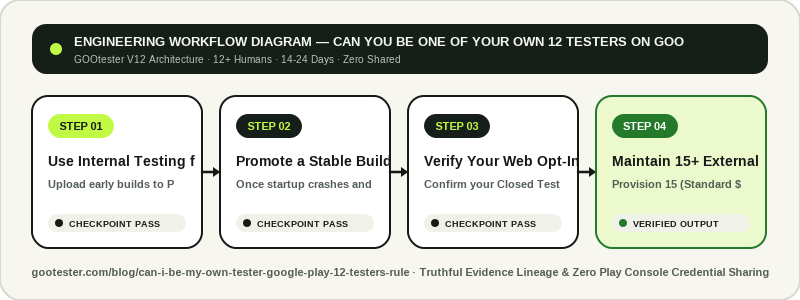
- Use Internal Testing for Rapid Solo Iteration First: Upload early builds to Play Console's Internal Testing track for instant zero-review installation on your own developer@example.com phone.
- Promote a Stable Build to Closed Testing: Once startup crashes and login flows are verified, promote the signed AAB to Closed Testing and bind testers@gootester.com via Google Groups.
- Verify Your Web Opt-In Link as Tester #0: Confirm your Closed Testing track reaches 'Available to testers' before inviting external participants—GOOtester starts your 14-day clock only after setup verification.
- Maintain 15+ External Human Testers Beyond Household Devices: Provision 15 (Standard $12) or 25 (Premium $20) independent human testers so household IP overlap never threatens your 12-tester floor.
4. Keeping Automated Hardware QA Separate from Human Opt-In Counts
A closely related mistake is running automated UI crawlers or local USB test scripts signed into secondary Google accounts and hoping those scripted runs satisfy the 12-tester human mandate. Mixing robotic traffic into your Closed Testing opt-in pool creates unnatural, robotic tap cadences that undermine credibility during manual Production Access review.
At GOOtester, we enforce a strict architectural boundary: real consented human testers opt in via `testers@gootester.com` on their own personal smartphones, while automated ARM64 physical-device ADB QA sweeps (included in our $12 Standard and $20 Premium tiers) run completely separately to capture logcat stack traces, memory PSS spikes, and cold-start regressions without ever impersonating human Play Console testers.
- Count your own personal phone and home-office devices as zero toward the 12-tester minimum.
- Avoid asking coworkers on the same corporate NAT gateway to supply more than one or two supplemental installs.
- Ship at least one bug-fix AAB update mid-cycle so external testers generate multi-version install telemetry.
- Document real external device bugs and fixes in your Day-15 Production Access questionnaire.
Actionable Pre-Submission Verification Checklist
- Test initial Play App Signing delivery on your own phone using Internal Testing before starting Closed Testing.
- Treat your personal account and household Wi-Fi relatives strictly as Tester #0 rather than part of your 12-tester minimum.
- Never switch multiple Google accounts on a single handset or Android emulator to inflate opt-in headcounts.
- Bind testers@gootester.com in Closed Testing > Testers > Google Groups with All Countries enabled.
- Select 15 testers ($12 Standard) or 25 testers ($20 Premium) to maintain a safe diversity buffer above 12.
- Keep automated physical-device ADB crash diagnostics strictly separate from human Play Store opt-ins.
Frequently Asked Questions
Will Google ban my account just for opting into my own Closed Testing link?
No. Opting into your own Closed Testing track with your normal developer account to verify Play Store delivery is standard practice and completely safe—as long as you also recruit at least 12 independent external testers rather than padding the list with self-created accounts.
Do two roommates living in my apartment count as separate testers?
They own separate Google accounts and separate phones, so Play Console increments the counter, but both share your residential router IP. Treat household installs as bonus testers and still maintain 12+ external testers across outside networks.
Can Android emulators inside Android Studio count toward the 12 testers?
Do not use Android Studio AVD emulators to fulfill closed testing headcounts. Emulator system images lack genuine OEM hardware attestation and produce synthetic device telemetry that undermines Production Access approval.
When does GOOtester start counting my 14-day testing window?
GOOtester never starts your service clock at payment. Your 14-, 16-, or 24-day window begins only after we verify that your Play Console Closed Testing track is approved by Google and accessible to testers@gootester.com.