1. The Agency Contagion Trap: How Shared Console Access Destroys Portfolios
Every experienced Flutter, React Native, or Kotlin freelancer eventually lands a non-technical founder client who says: *'I don't have a D-U-N-S number yet, so I opened a Personal Play Console account—here is my Gmail password, please handle the 12 testers and launch it for me.'* Typing that client's owner credentials into your laptop browser is one of the highest-risk mistakes in mobile consulting.
Google Play's anti-abuse engine continuously maps **Associated Developer Accounts** across shared browser sessions, IP addresses, payment cards, `Users and permissions` admin memberships, and reused signing keystores. If you attach `developer@example.com` as an Admin across twelve clients—and Client #4 six months after handoff pivots their app into restricted gambling or copyright infringement—Google's automated enforcement can terminate Client #4 *and* flag associated accounts!
| Agency Handoff Pattern | Contagion Isolation | Client Effort | Verdict for Freelancers & Studios |
|---|---|---|---|
| Zero-Access Handoff (Client uploads AAB + Group) | Maximum (100% air-gapped) | 10 mins via screen-share | Gold standard — zero account linkage |
| Per-Client Scoped Release Role (1 app only) | Moderate (explicitly linked) | 2 mins invite | Acceptable only for trusted enterprise clients |
| Agency Master Email as Admin on 10+ Clients | Critical contagion risk | Low | Dangerous — one bad client risks portfolio |
| Publishing Client Apps on Agency's Own Console | Catastrophic liability | Zero | Never — agency owns legal & policy strikes |
3. Structuring 14-Day Closed Testing Into Freelance Milestone Contracts
Uninformed clients often assume Android deployment takes one afternoon like pushing a Vercel website, then blame the freelancer when Google Play enforces a 2-to-5-day initial review plus 14 consecutive days of closed testing plus Production Access review!
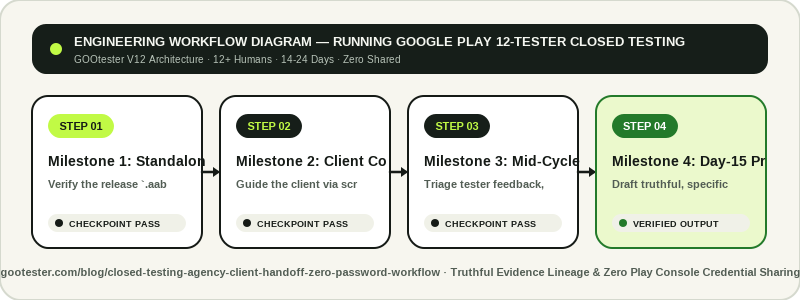
Protect scope, cash flow, and client expectations by splitting Android delivery into four explicit contract milestones.
- Milestone 1: Standalone Physical-Device ADB Pre-Flight: Verify the release `.aab` via `bundletool` and GOOtester's standalone ARM64 ADB QA (included in $12 Standard / $20 Premium) so v1.0 has zero startup crashes.
- Milestone 2: Client Console Submission & Group Verification: Guide the client via screen-share to submit v1.0 with `testers@gootester.com`; GOOtester's clock starts only once Google approves the track.
- Milestone 3: Mid-Cycle Iterative AAB Bug-Fix Release (Day 6–9): Triage tester feedback, compile `versionCode + 1` with tangible UX/stability fixes, and have the client upload the update to demonstrate real iteration.
- Milestone 4: Day-15 Production Access Narrative & Graduation: Draft truthful, specific engineering answers for the client's 3 Production Access questions documenting real bugs fixed during the test.
4. Setting Truthful Client Contracts Around Google Play Review Decisions
Never write a freelance contract promising *'100% Guaranteed Google Play Approval in 14 Days'*. Google Play alone decides Production Access, review queues fluctuate, and GOOtester never guarantees Google approval or fabricates Play Store reviews. What you *can* guarantee professionally is delivering a crash-free `targetSdk = 36` binary, maintaining 15–25 real opted-in testers (`$12` Standard for 15 testers/16d or `$20` Premium for 25 testers/24d), and shipping documented mid-cycle fixes.
Using GOOtester's $20 Premium tier (25 human testers across 24 consecutive days + standalone ARM64 ADB QA) is an agency favorite because a $20 pass-through cost gives client projects a 13-tester headcount cushion and 10 extra days of coverage during client handoff delays.
- Encourage funded business clients to apply for D-U-N-S Organization accounts early in Week 1 of development.
- Never pay a client's `$25` Google Play registration fee using your own agency credit card!
- Keep automated ADB QA logs cleanly separated from human tester opt-in counts in client status reports.
- Remind clients not to pause Closed Testing until their promoted Production release is live on Google Play.
Actionable Pre-Submission Verification Checklist
- Ensure the client registers and pays for their own Play Console account on their own card and computer.
- Generate an isolated upload keystore (`.jks`) unique to that single client application.
- Never sign into client owner Gmail accounts or link one agency admin across dozens of unrelated clients.
- Guide the client via screen-share to bind `testers@gootester.com` and enable All Countries on Closed Testing.
- Ship at least one mid-cycle `versionCode` update during the 14-day window to build strong release telemetry.
- State clearly in client SOWs that Google Play alone grants Production Access and review times vary.
Frequently Asked Questions
Why shouldn't I publish a client's app under my own agency Google Play account?
Publishing client apps on your own console makes your agency legally responsible for their content, mixes tax/payout accounting, and means a single client policy violation can get your entire agency Play Console terminated.
What if an enterprise client requires our CI/CD pipeline to upload AABs automatically?
For vetted, long-term enterprise Organization clients, have the client create a project-isolated Google Cloud Service Account in *their* cloud org scoped strictly to release tracks for that single app—never shared across other clients.
Which GOOtester tier works best for client projects?
Agencies typically choose Premium ($20 one-time per app: 25 real human testers for 24 days + standalone physical-device ARM64 ADB QA) so slow client turnarounds between Day 14 and Production submission stay fully covered.
Does GOOtester ever need access to my client's Play Console or keystore?
Never. GOOtester operates on a strict zero-credential model: the client simply adds testers@gootester.com under Closed Testing > Google Groups and shares the public Web Opt-In link.