
1. Trader vs. Non-Trader: Why Sole Proprietors With Ads Are Still Traders
Few Play Console prompts cause more anxiety for solo developers working from an apartment than the European Union Digital Services Act (DSA) **Trader status** declaration. Under EU consumer law, a 'trader' is any natural person or legal entity acting for purposes relating to their trade, business, craft, or profession—regardless of whether you formed a limited liability company or registered a Personal Developer Account.
In practical Google Play terms, if your app charges an upfront price, sells in-app purchases or subscriptions via Play Billing, displays commercial third-party advertising (such as AdMob), or acts as a companion storefront for a paid SaaS product, you are acting as a Trader whenever you distribute to EEA member states. Conversely, a genuinely free, ad-free open-source utility or portfolio hobby project with zero monetization qualifies as a **Non-Trader**.
| App Monetization Model | Account Type | EU DSA Status | Public EEA Store Disclosure |
|---|---|---|---|
| 100% free, zero ads, zero IAPs, non-commercial | Personal | Non-Trader | Developer name + country + support email |
| Free download with AdMob / Unity Ads banners | Personal or Org | Trader | Legal name, verified address, phone & email |
| Freemium app with Play Billing subscriptions/IAP | Personal or Org | Trader | Legal name, verified address, phone & email |
| Commercial app excluding all 30 EEA countries | Personal or Org | EEA-exempt scope | Standard non-EEA developer contact info |
2. Protecting Your Bedroom Address, Personal Phone & Owner Inbox Lawfully
Never fabricate fake street addresses or disposable temporary SMS numbers in Play Console—Google verifies Trader addresses against official documentary evidence (utility bills, bank statements, lease agreements, or business registrations) and verifies phone numbers via live OTP challenge. Submitting forged documents triggers irreversible account termination.
Instead, build legitimate operational separation before completing Trader verification. First, never expose your Play Console owner email; verify a dedicated public customer support address (for example, `developer@example.com` or `support@gootester.com` on your custom domain) under **Developer profile**. Second, provision a permanent secondary eSIM line or business number you control long-term for public phone verification. Third, if you monetize seriously in Europe, forming a low-cost LLC/Ltd paired with a leased virtual office street suite (not an unstaffed PO Box where street documentation is required) keeps your residential address off public store pages.
[Play Console Owner Login]  -> Kept 100% private; hardware passkey 2FA enabled
[Public Support Email]      -> developer@example.com (verified via OTP in Developer Profile)
[Public Trader Phone]       -> Dedicated secondary eSIM / business line (receives SMS/voice OTP)
[Verified Trader Address]   -> Registered entity + documented commercial office lease / bank statement
                               (Or disable 30 EEA countries if non-EU dev declines public address)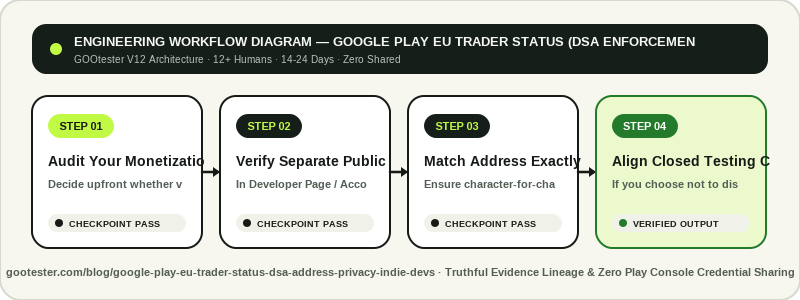
3. Configuring Trader Declarations Cleanly Before Starting Closed Testing
Unresolved Account Verification or EU Trader verification banners inside Play Console can block new app releases—including your Closed Testing track—from going live in European regions. Resolve your declaration cleanly *before* binding `testers@gootester.com` so European testers in your cohort never hit regional unavailability walls.
Follow these four verification checkpoints to ensure your Developer Profile, Payment Profile, and Closed Testing Country Availability stay 100% aligned.
- Audit Your Monetization Roadmap Honestly: Decide upfront whether v1.0 includes ads, IAPs, or paid access; declare Trader if monetized in the EEA, or Non-Trader only if strictly non-commercial.
- Verify Separate Public Support Email & Secondary Phone: In Developer Page / Account Details, verify a dedicated domain support email (such as developer@example.com) and dedicated business eSIM before submitting.
- Match Address Exactly Across Supporting Documents: Ensure character-for-character street formatting parity between your Google Payments profile and the PDF statement uploaded for Trader verification.
- Align Closed Testing Country Availability: If you choose not to distribute in the EEA to keep a residential address private on a Personal account, uncheck EEA states consistently only on Production—or complete Trader verification for global reach.
4. Starting Ad-Free as a Non-Trader and Upgrading Later
What if your MVP launches completely free with zero ads, zero tracking, and zero in-app purchases while you validate product-market fit? In that genuinely non-commercial phase, declaring **Non-Trader** is accurate and keeps your physical home address off EEA Play Store listings during both your 14-day closed test and initial public launch.
Later, once traction justifies forming an LLC, opening a business bank account at a commercial suite, and integrating Play Billing or AdMob, you can update your Play Console declaration to **Trader** (or transfer the app to a D-U-N-S verified Organization account) before shipping your first monetized release.
- Never use your primary Google Account login email as your public Play Store support email.
- Retain ownership of your verified Trader phone number permanently so periodic re-verification OTPs never fail.
- Verify Closed Testing track approval before starting your GOOtester 12–25 tester campaign ($6 Basic, $12 Standard, $20 Premium).
- Keep PDF copies of bank or registration statements matching your exact Google Payments profile address.
Actionable Pre-Submission Verification Checklist
- Classify your app honestly as Trader if it contains ads, IAPs, subscriptions, or paid downloads in the EEA.
- Set a dedicated custom-domain inbox (e.g., developer@example.com) rather than your owner login for public support.
- Provision a long-term secondary eSIM or business phone number before completing Trader OTP verification.
- Ensure uploaded address verification PDFs match your Google Payments profile character for character.
- Clear all Play Console identity and DSA banners before submitting your Closed Testing AAB for review.
- Re-update Non-Trader to Trader status prior to introducing AdMob or Play Billing in a future app update.
Frequently Asked Questions
Am I considered an EU Trader if I live in the US or Asia and have no company?
Yes, if your app is available in European Economic Area countries and generates commercial revenue through ads, in-app purchases, or paid downloads. DSA Trader status depends on targeting EEA consumers commercially, not where you live.
Can I exclude EU/EEA countries if I refuse to display an address publicly?
DSA public trader disclosures apply specifically to apps distributed in the EEA. However, verify your regional strategy carefully before closed testing so global testers in testers@gootester.com can still access enabled regions.
Does a standard USPS PO Box pass Google Play street address verification?
Google Payments and DSA identity checks generally require a verifiable physical street address rather than a bare PO Box number. Solo founders wanting address privacy typically form an entity paired with a documented commercial office suite.
Can I launch completely free as Non-Trader now and switch to Trader in v2.0?
Yes. If v1.0 has zero monetization, zero ads, and no commercial purpose, Non-Trader is accurate. You must switch to Trader and complete address/phone verification before publishing any update that adds ads or billing.