
1. Why 'Just Open Stripe in Chrome' Still Triggers Instant Rejections
Cross-platform SaaS founders frequently port an existing web app (already wired to Stripe, Paddle, or Lemon Squeezy) to Android, leave an `'Upgrade to Pro — $12/mo'` button that opens `checkout.example.com` in a browser tab, and upload their `.aab` to Closed Testing. Within 48 hours, Google Play rejects the release for **Violation of Payments Policy**.
Even in jurisdictions with antitrust or Digital Markets Act frameworks (EEA, US, South Korea, Japan, India), using alternative payment processors or linking out to external web offers for digital in-app goods requires **explicit Play Console program enrollment**, country-scoped build/API gating, and compliance with Google's program APIs and applicable fee structures (where governed). Dropping an undeclared web checkout URL into a global `.aab` violates the Developer Distribution Agreement.
| What Your App Sells | Allowed Payment Rail | Play Console Enrollment Needed? | Steering / External Web Link Allowed? |
|---|---|---|---|
| Digital SaaS, AI credits, Pro features, games | Google Play Billing v7/v8 (15% first $1M) | Standard Merchant Profile | No external checkout links (unless enrolled below) |
| Cross-platform SaaS ('Consumption-Only') | Existing web account login only (no in-app buy) | Standard App Access demo login | NO — zero pricing copy or 'Buy at example.com' links! |
| Enrolled User Choice / Alternative Billing | Play Billing + Approved Alt Processor | Yes — UCB / ABO regional program + APIs | Governed by regional UCB UX & 24h token reporting |
| Enrolled External Offers (e.g., EEA DMA) | External web checkout in eligible countries | Yes — External Offers program + APIs | Yes, ONLY in enrolled regions using External Offers API |
| Physical goods, hardware, real-world services | Stripe, Adyen, PayPal, PIX, UPI direct | No Play Billing allowed for physical goods | Yes — standard e-commerce checkout required |
2. Consumption-Only Reader Mode vs. Enrolled External Offers APIs
If you run an existing B2B or cross-platform web SaaS and do not want to maintain Play Billing SKUs in v1.0, Google Play permits **consumption-only** apps—meaning existing subscribers can sign in (`reviewer@example.com` for Play review) and use their paid account features on Android. However, the **anti-steering boundary** (outside enrolled External Offers territories) is razor-sharp: your Android binary cannot display upgrade buttons, pricing tables, clickable URLs to your pricing page, or even plain-text instructions saying *'Visit example.com in a browser to upgrade'*!
Conversely, if you formally enroll in **User Choice Billing** or **External Offers** for supported regions, your Android client must query `BillingClient` eligibility (`isAlternativeBillingOnlyAvailableAsync` / `createExternalOfferReportingDetailsAsync`) dynamically per user storefront country rather than hardcoding external links globally.
// Safe v1.0 pattern: Never render web Stripe links on Android for digital goods!
enum class MonetizationMode { PLAY_BILLING_NATIVE, CONSUMPTION_ONLY_NO_UPGRADE_UI }

fun resolveUpgradeAction(mode: MonetizationMode, onLaunchPlayBilling: () -> Unit) {
    when (mode) {
        MonetizationMode.PLAY_BILLING_NATIVE -> {
            // Standard compliant global path (15% Google Play service fee tier up to $1M/yr)
            onLaunchPlayBilling()
        }
        MonetizationMode.CONSUMPTION_ONLY_NO_UPGRADE_UI -> {
            // Consumption-only mode: render zero external URLs or web pricing copy
        }
    }
}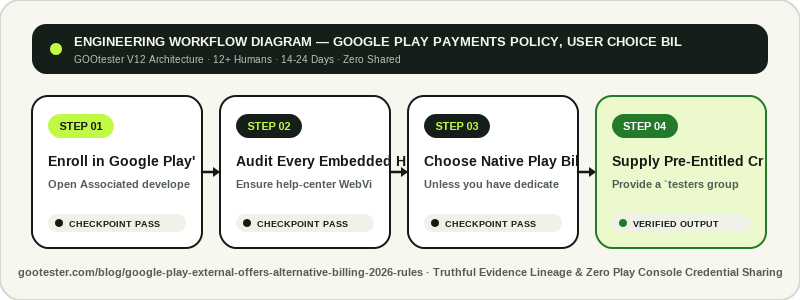
3. 4-Step Payments Policy Pre-Flight Audit Before Closed Testing
Run this four-step audit across your UI screens, webviews, and account settings before uploading your `.aab` to Closed Testing.
- Enroll in Google Play's 15% Service Fee Tier ($0–$1M USD/yr): Open Associated developer accounts & Play Console 15% service fee enrollment so subscriptions and digital IAPs pay 15% rather than legacy 30% rates.
- Audit Every Embedded Help, Settings & Account Management Screen: Ensure help-center WebViews inside your app don't accidentally link two clicks away to a live web Stripe SaaS pricing/checkout page!
- Choose Native Play Billing v7/v8 for Clean Global v1.0 Approval: Unless you have dedicated legal/backend engineering for regional External Offers token reporting, ship standard Play Billing for frictionless 170-country approval.
- Supply Pre-Entitled Credentials in App Access & Soft-Gate Beta: Provide a `reviewer@example.com` login in App Access and keep Closed Testing accessible to `testers@gootester.com` without real-money paywall blocks.
4. Indie Math: Why Standard Play Billing Beats Custom Compliance Tax in v1.0
When you add up Merchant-of-Record global VAT remittance across 60+ countries, chargeback handling, Google's ongoing external/alternative billing service fees, 24-hour backend token reporting APIs, and the engineering weeks lost to Payments Policy rejections, native **Google Play Billing** (at 15% on your first $1M/year, with Google handling global sales tax/VAT remittance automatically) wins overwhelmingly for solo founders.
Focus your Closed Testing energy on product retention across 12–25 real human testers via GOOtester ($6 Basic / $12 Standard / $20 Premium) and separate ARM64 physical-device ADB QA ($12 Standard / $20 Premium). Google Play alone decides policy compliance and Production Access, and GOOtester's clock starts only after verified Play Console track setup.
- Never use Google Play Billing for physical merchandise, event tickets for in-person venues, or peer-to-peer physical services.
- Clearly separate 1-to-1 live human coaching/telehealth rules from automated AI coaching (automated AI features are digital goods!).
- Sync web Stripe and Android Play Billing entitlements cleanly in one unified backend `entitlements` table or RevenueCat project.
- Re-check regional US/EEA/JP/KR Play Console policy announcements semi-annually if scaling past $1M ARR.
Actionable Pre-Submission Verification Checklist
- Remove all unapproved Stripe, PayPal, Paddle, or Lemon Squeezy digital-goods links from your Android UI.
- Ensure in-app Help/FAQ WebViews cannot navigate users onto your website's web-checkout page.
- Enroll in Google Play's 15% ($1M tier) service-fee program under Play Console settings.
- If using Consumption-Only mode, strip all pricing text and 'Subscribe on our website' prompts from Android.
- Never use remote feature flags to hide external payment links from Google Play reviewers (anti-cloaking).
- Provide pre-unlocked `reviewer@example.com` credentials in App Access before starting 14-day Closed Testing.
Frequently Asked Questions
Didn't court rulings and the EU DMA allow me to put a Stripe checkout link in my Android app?
Regional rules (such as EEA External Offers, US court remedies, South Korea, or Japan) each operate through specific geographic scopes and formal Play Console enrollment/API requirements—they do NOT permit dropping unapproved global Stripe links into an unenrolled worldwide `.aab`.
Can my users buy a subscription on my website and log into my Android app with that account?
Yes! Cross-platform entitlement syncing is 100% allowed. Users who subscribed on your web app can sign into Android and enjoy Pro features—you simply cannot link or steer users from inside the Android app to your web checkout unless enrolled in an eligible External Offers program.
Am I allowed to use Stripe inside my Android app if I sell printed photo books or coffee beans?
Yes—in fact, you MUST use an external payment processor like Stripe or Google Pay API for physical goods and real-world services, because Google Play Billing is strictly reserved for digital in-app content.
Does an AI chatbot or AI image credit pack count as a digital good requiring Play Billing?
Yes. AI tokens, LLM message credits, cloud GPU renders, and automated AI coaching subscriptions consumed inside the app are digital goods subject to Google Play's Payments Policy.